 Filepetal
How to convert AI to PNG
- Choose one .ai file containing PDF-compatible or EPS-compatible artwork.
- Choose Transparent or White, then select Convert to PNG.
- Inspect the actual first PNG. A multi-page PDF representation downloads as a ZIP; check each image after extraction.
A shareable image, with a background you can check
AI here means Adobe Illustrator artwork, not an AI image generator. This tool rasterizes the compatible artwork into PNG. It does not keep editable layers, export each object separately, or remove a white shape already present in the design. Your file is processed in the browser. Keep the original AI master for editing.
Original compatibility and background experiments
An unpainted page is different from a painted white shape
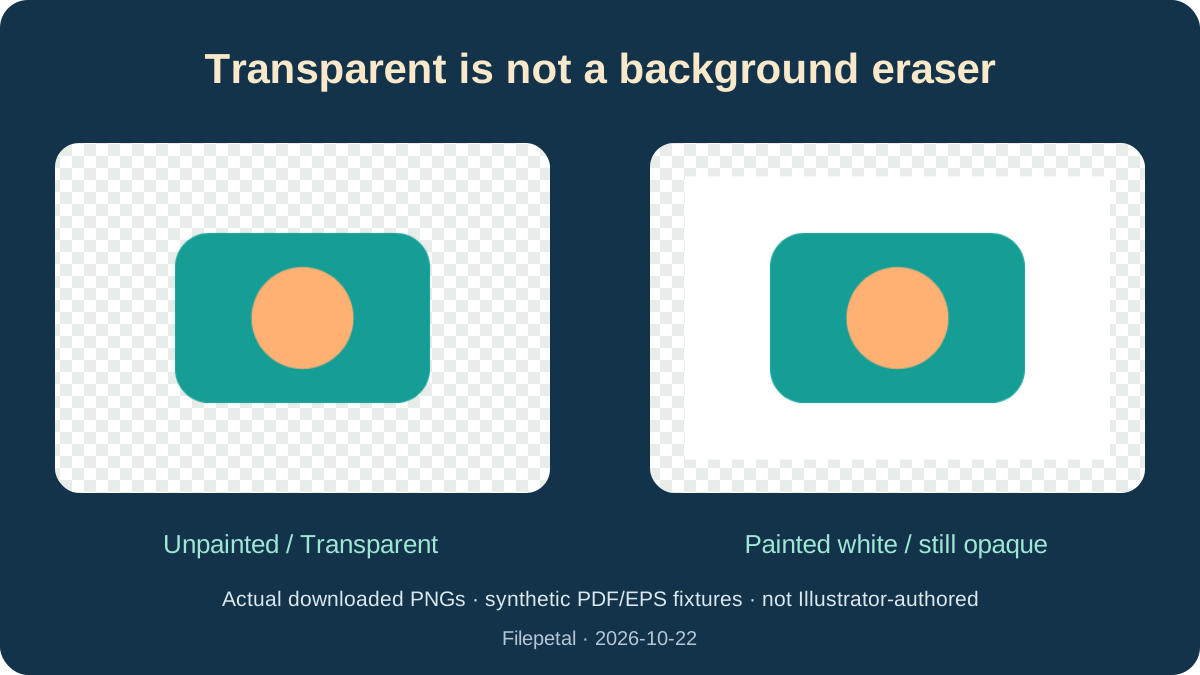
On October 22, 2026, we generated two 180 × 120 point PDF representations with the same teal and peach artwork, stored with .ai extensions. One leaves the page background unpainted. The other explicitly draws a white rectangle behind the design. These are controlled synthetic renderer fixtures, not files exported from Illustrator, and they contain no Illustrator-private editing data. They test the compatible rendering path rather than certifying native AI compatibility.
The previous page converted the unpainted sample into an entirely opaque 360 × 240 PNG. The updated Transparent choice produces a 6,302-byte PNG with a transparent corner, while White produces the same 6,248-byte opaque output as the previous page. Both results are actual downloads. This is a new background choice for this page, and a correction to the PDF-compatible path losing unpainted transparency.
The painted-white sample still produces a 6,248-byte opaque PNG when Transparent is selected. That is expected: transparency preserves unpainted regions; it does not erase an existing white object. Switching the background choice clears the old result so that it cannot be mistaken for the newly selected output. Reconvert, then place the PNG over a contrasting color in your intended application before sharing.
The compatible representation determines pages and dimensions
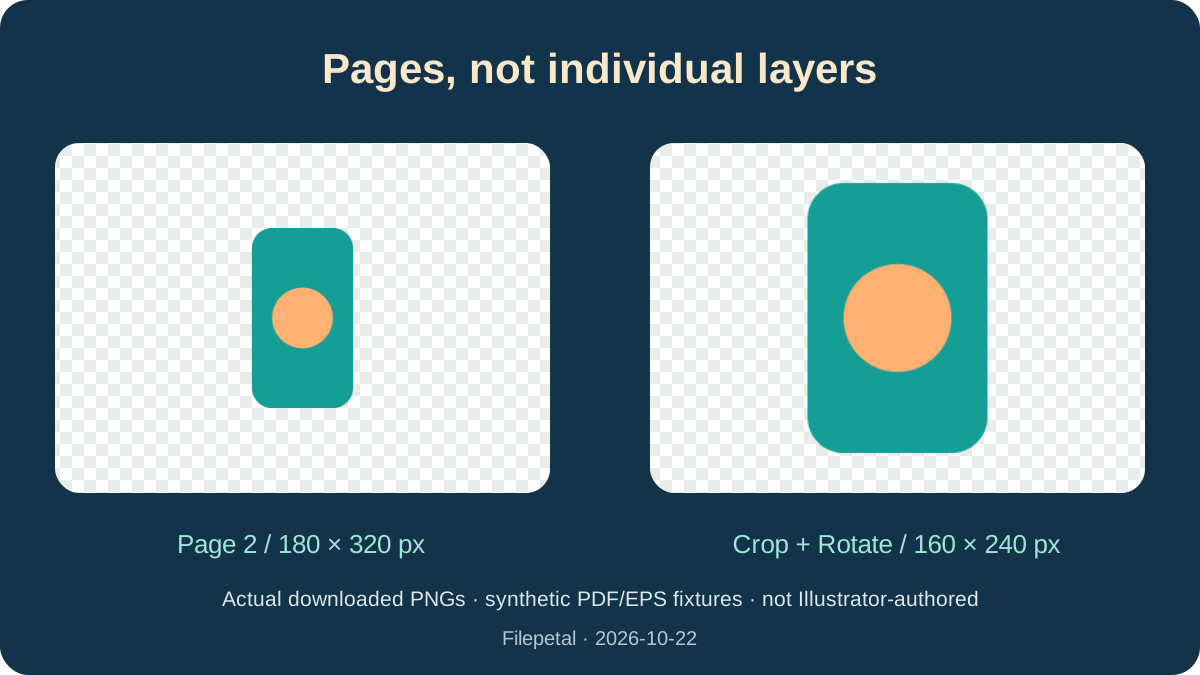
Our three-boards.ai fixture contains three PDF pages sized 180 × 120, 90 × 160 and 210 × 90 points. The existing multi-page export produces page-01.png through page-03.png, now at 360 × 240, 180 × 320 and 420 × 180 pixels with Transparent selected. The actual ZIP is 15,889 bytes; its individual PNGs are 6,302, 4,916 and 5,055 bytes. The tool now previews the first output and lists all three filenames, sizes and byte counts.
A page is not a layer. This experiment models separately stored pages; it does not prove that every Illustrator artboard or hidden layer will be present in every AI file. Only the pages exposed by the compatible representation are rendered. The existing ZIP export was already available before this update. The preview and output list are new; they are not an all-artboard editing interface or a separate-layer exporter.
Our crop-rotate.ai starts with a 180 × 120 point MediaBox, a 120 × 80 point CropBox and a 90-degree rotation. Its actual PNG is 160 × 240 pixels and 4,887 bytes. Cropping selects the visible region before rotation changes the viewing orientation. Looking only at the outer document size would predict the wrong shape. Use the downloaded PNG dimensions to decide whether the result suits your layout.
PDF-compatible and EPS-compatible paths do not have the same scale
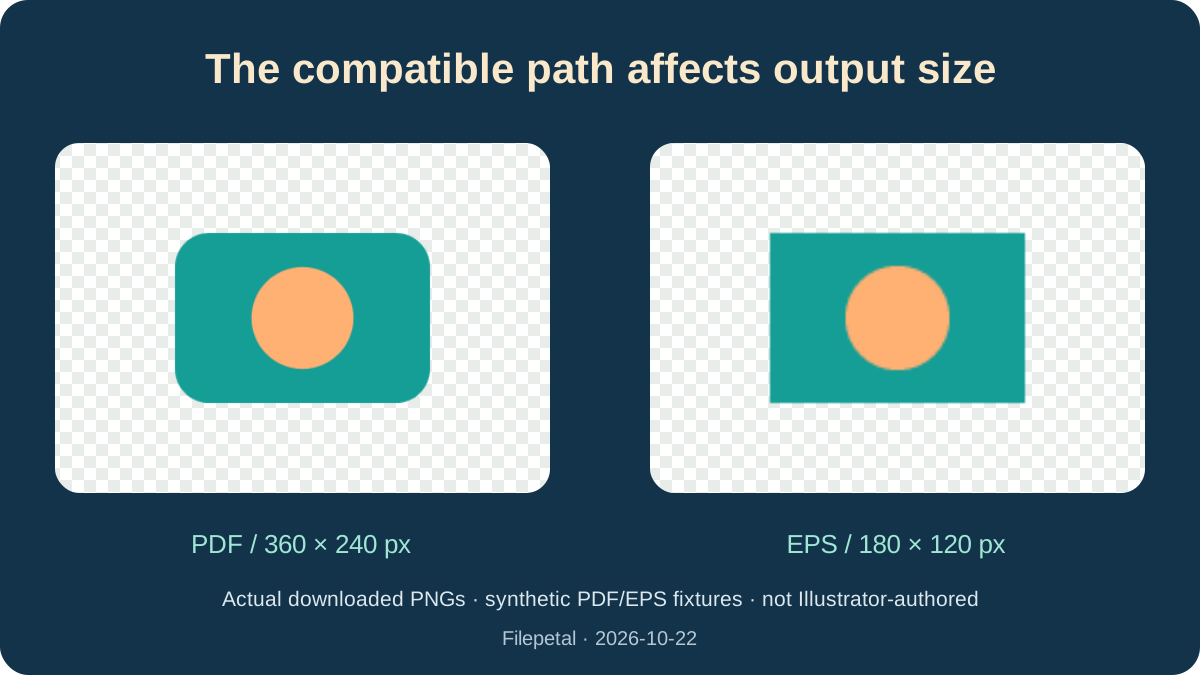
The unpainted PDF representation renders at two pixels per point for this small fixture, giving 360 × 240 pixels. Our separate hand-written EPS-compatible AI uses a 180 × 120 point BoundingBox and exports at 180 × 120 pixels. Its Transparent PNG is 1,687 bytes and matches the previous EPS output byte for byte; White creates a 1,685-byte opaque PNG. EPS transparency was already supported. These are different synthetic files, not two Illustrator exports proven to have identical artwork.
The large-board.ai fixture has a 3000 × 1800 point page. Its actual output is 4096 × 2458 pixels, not 6000 × 3600. The existing renderer reduces its scale to stay within the per-side and per-page raster limits. The rounded height follows the renderer viewport. This update adds no DPI or custom-resolution selector, and it makes no claim that a small output becomes suitable for high-resolution print simply because the source uses vectors.
The invalid-signature fixture and the malformed PDF-header fixture both stop with an error and create no download. A .ai filename alone does not make a file usable. Adobe documents that Create PDF Compatible File stores a PDF representation; ask the sender for a compatible copy if the required representation is absent. This test did not run Illustrator, compare competitor conversions, verify spot colors or linked assets, or certify fonts and every blend mode.
Download the exact inputs and actual PNGs
Test date: October 22, 2026. Original synthetic PDF/EPS representations stored as .ai, not Illustrator-authored originals. Input dimensions below describe PDF CropBoxes or EPS BoundingBoxes in points; output dimensions are pixels. The complete manifest retains MediaBoxes, rotations, byte counts and full SHA-256 hashes. Different browsers may encode different PNG bytes. The generator requires Python, reportlab and pypdf.
| Sample | AI | PNG |
|---|---|---|
| unpainted | unpainted.ai 180 × 120 pt · 1,511 bytes SHA-256a8f3fbc6f78e95c3116a107c732c2ab1a73071bd6ed1ec5597f591fa6181236e | unpainted-transparent.png 360 × 240 · 6,302 bytes SHA-256b49b70ffb5d87481b0da42aa11f8dfee5352b6423850e7515597384fa2c691ddunpainted-white.png 360 × 240 · 6,248 bytes SHA-2567d59597936a5a3eddac550c2a9741b3eeffd82300344e9785e3a90659a84ca00 |
| painted-white | painted-white.ai 180 × 120 pt · 1,527 bytes SHA-25685e7bf259961ce5f29e63a8c751a564b1b5b48943c9e604b407ddb4b32c0feab | painted-white-transparent.png 360 × 240 · 6,248 bytes SHA-2567d59597936a5a3eddac550c2a9741b3eeffd82300344e9785e3a90659a84ca00 |
| crop-rotate | crop-rotate.ai 120 × 80 pt / Rotate 90 · 1,113 bytes SHA-256fde5a2390c7063e5a0f6ee0473df34abcc35491e1cb09f4d0d039cfb2da471b5 | crop-rotate-transparent.png 160 × 240 · 4,887 bytes SHA-256ec13ada4597c47212e0e0748ddc8843e8a87ef26e9a9391798d866596fd01183 |
| three-boards | three-boards.ai 180 × 120 pt; 90 × 160 pt; 210 × 90 pt · 2,714 bytes SHA-256071e07e865c9de54e03f848e3f493b7ba5a7b8c7a0d4b889c91e75be021c411f | page-01.png 360 × 240 · 6,302 bytes SHA-256b49b70ffb5d87481b0da42aa11f8dfee5352b6423850e7515597384fa2c691ddpage-02.png 180 × 320 · 4,916 bytes SHA-256ecd50c070ada65ba72d02f6fa4f051f76156c53cfeb6c4d80982c0a7f6768cdepage-03.png ZIP · 15,889 bytes420 × 180 · 5,055 bytes SHA-25664b6c4332f54fe30ecc692875d5274cb2604e80b21c9cb1f389879e70b7f7f78 |
| large-board | large-board.ai 3000 × 1800 pt · 1,518 bytes SHA-25630101a31723f062570cc354cc5bab6e43e84a33224eff907a6260f8cdda20560 | large-board-transparent.png 4096 × 2458 · 242,975 bytes SHA-25699ce75ded6df2628291a7f9379e9de5bfe822e5388aa731ec3b96dbf4b5766ac |
| eps-compatible | eps-compatible.ai 180 × 120 pt / EPS BoundingBox · 243 bytes SHA-256bcac1f14cef64f6073113e61be6209904d2bcd5ca729d71dfb44b3af51e64824 | eps-compatible-transparent.png 180 × 120 · 1,687 bytes SHA-256a24099f4fbaa4867de04cf9c78896bca89bbb0d34d1e72f65c48eb286fd85471eps-compatible-white.png 180 × 120 · 1,685 bytes SHA-25655558785e0c930d77c78eb26bc2fc40e2f3eaa2fccfd7ebfc05d2c33a350da6b |









Full input/output hashes and verification manifest · Input generator
Diagnostic inputs: invalid.ai · broken-pdf.ai ·
Current scope and limits
One .ai at a time, up to 20 MB. PDF-compatible pages are processed sequentially; EPS-compatible artwork uses the existing Ghostscript path. Rendering remains limited to 4096 pixels per side and 16 million pixels per page. This page has no DPI selector, object editor, background eraser, batch file picker or editable-layer export. Transparency and White affect the output background, not painted artwork. Keep your AI source.
AI to PNG questions
Why does my transparent PNG still have a white background?
Transparent preserves unpainted regions but does not delete a white object in the design. Our unpainted fixture becomes transparent; the explicitly painted white sample stays opaque. Check the actual preview and the PNG in its destination application.
Can I convert AI without Illustrator?
This tool can render PDF-compatible and EPS-compatible representations in the browser. It cannot open every Illustrator-private file. Ask the sender to save a compatible copy if necessary; Adobe explains the PDF-compatible saving option in its documentation.
Will each layer become a separate PNG?
No. It exports compatible pages, not individual layers or objects. Our three-page fixture becomes three PNGs in a ZIP. The first preview is only page one; open the archive to inspect the rest.
Why are my output dimensions different?
The PDF-compatible path uses the visible page region, rotation and a capped rendering scale. EPS uses its BoundingBox and a different rendering scale. Our small PDF and EPS cases output 360 × 240 and 180 × 120 respectively. No custom DPI setting is available here.
Does PNG keep the original vector quality and editing data?
PNG is a raster output. Its pixels do not retain Illustrator paths, editable text or layers. Keep the original AI file and inspect the exported image at its intended display size. The synthetic tests do not certify exact colors, fonts or complex effects.