 Filepetal
How to convert EPS to PNG
- Choose one EPS file with a numeric BoundingBox in its header.
- Choose 72, 144 or 300 DPI, then select Convert to PNG.
- Inspect the actual PNG preview and dimensions, then download. Changing DPI clears the previous result; convert again.
Choose a useful PNG size before sharing
EPS contains drawing instructions and can also contain embedded bitmap pictures. PNG is a fixed grid of pixels. This tool renders the EPS in your browser and saves one still PNG; it does not keep vector editing, separate layers or scalable paths. The new resolution selector changes how many pixels are rendered. It does not remove objects, repair missing fonts or recover detail absent from a bitmap. Keep your source EPS.
Original resolution and bounding-box experiments
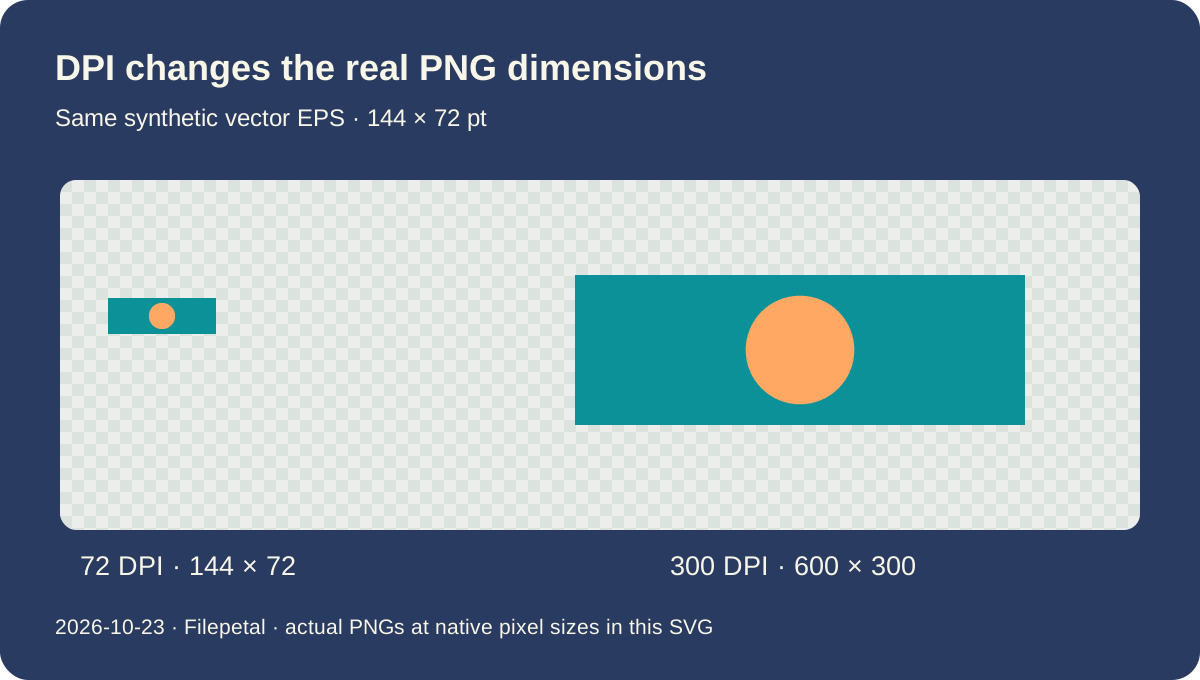
The same vector drawing at three resolutions
On October 23, 2026, we wrote a small EPS containing a teal rectangle and a peach circle. Its BoundingBox runs from 0,0 to 144,72 points. We selected each resolution in the actual tool and downloaded every result. At 72 DPI, the PNG is 144 × 72 pixels and 996 bytes. At 144 DPI it is 288 × 144 and 2,431 bytes. At 300 DPI it is 600 × 300 and 6,687 bytes. The three complete files and their hashes are available below.
For this integer-point sample, output width is 144 points × selected DPI ÷ 72, and height follows the same calculation. Doubling the DPI doubles both sides, producing four times as many pixels. It does not merely change a print label on the same image: these downloads have different actual raster dimensions. Their compressed byte counts do not rise by the same factor because PNG compression depends on the rendered image. Use dimensions to choose a useful output and bytes to check a download limit.
The previous version always used 72 DPI. The new default remains 72, and the six normal 72-DPI outputs in our test match the previous version byte for byte. The selector adds 144 and 300 DPI for this EPS-to-PNG page. Higher resolution is optional. If the existing small PNG is already large enough for your intended placement, a larger file is not automatically more useful. We have not tested printed output or promised a particular printer result.
A bounding box is a crop rectangle, not an instruction to find the logo
Our shifted-origin EPS moves the same drawing by 30 points horizontally and 40 vertically, and changes its BoundingBox to 30,40,174,112. At each of the three resolutions its downloaded PNG matches the zero-origin sample byte for byte. A nonzero lower-left coordinate does not necessarily add a margin; the extent between both corners is what matters in this controlled case. The Ghostscript renderer is already configured to crop to the declared EPS box. This crop behavior existed before the update.
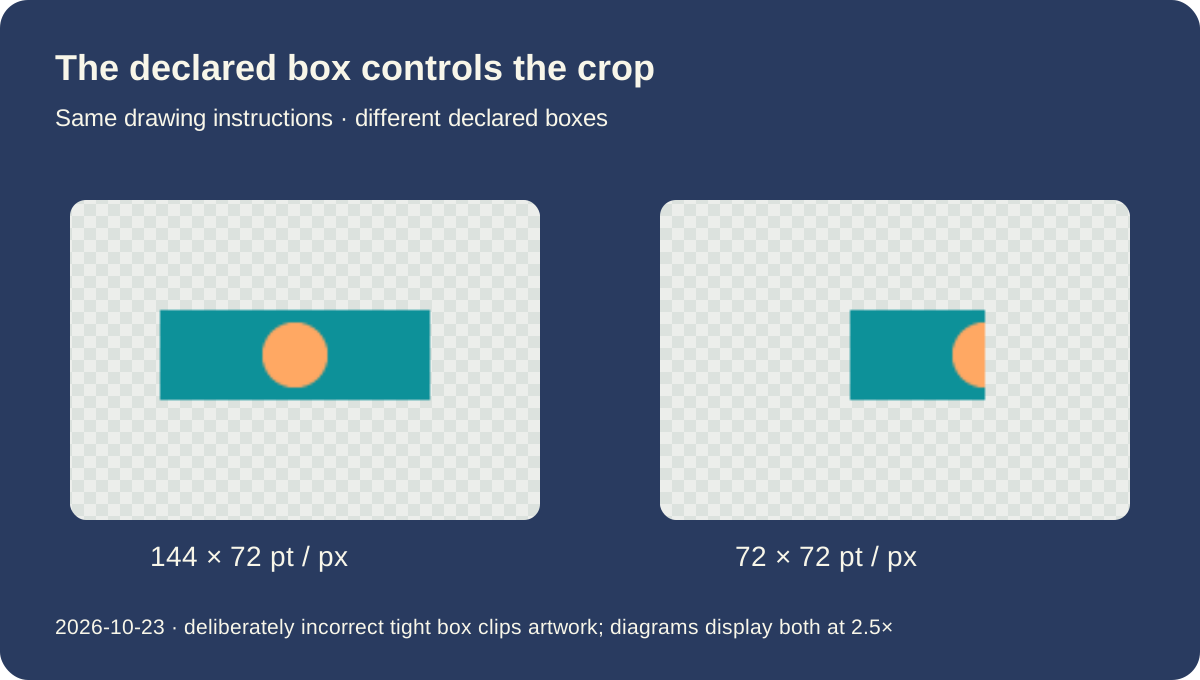
We then deliberately changed only the declared box to 0,0,72,72 while leaving the wider drawing in the program. Its actual 72-DPI output is 72 × 72 pixels and 635 bytes, with the right-hand part cut off. This is intentionally an incorrect source box, not a properly bounded design. Increasing the resolution creates more pixels inside that same cropped region. It cannot retrieve artwork outside the box. If a real source clips its drawing, correct its export or bounding box in the authoring application.
A separate diagnostic file places only the word atend in its header and the numeric box in its trailer. During testing, the earlier check found those later numbers, but the renderer produced a 2550 × 3300 pixel page at 300 DPI instead of the expected small artwork region. This update rejects that unsupported header arrangement before rendering. It does not add general trailer-box support. Another 1200-point-wide input is valid at 72 DPI but exceeds the existing 4096-pixel side limit at 300; lower the selected DPI rather than expecting a cropped or partial download.
More pixels do not redraw an embedded bitmap
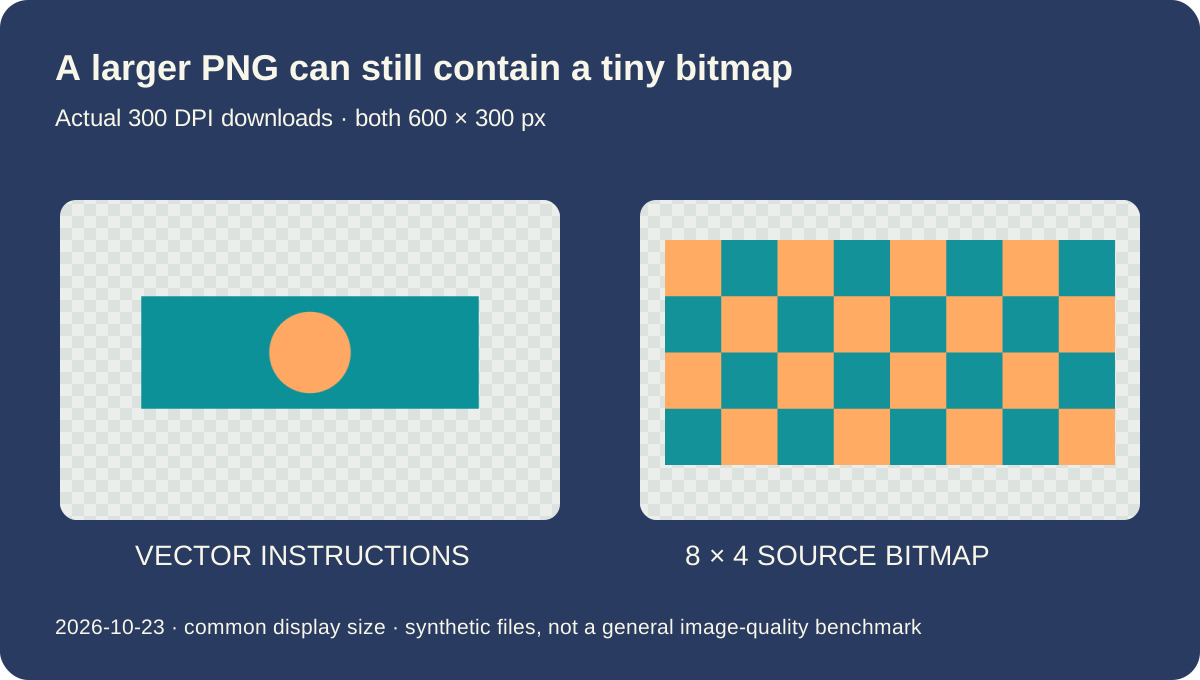
Our embedded-raster EPS contains a deliberately tiny 8 × 4 pixel, two-color bitmap stretched across the same 144 × 72 point box. Its downloaded PNGs have the same three output dimensions as the vector sample, but the source still contains only eight columns and four rows of picture information. In this controlled test, each output retains the two source colors; the large blocks remain visible in the actual saved images. The 300-DPI PNG is 4,997 bytes. It is a larger rasterization of a tiny bitmap, not a reconstructed vector drawing.
Compare that sample with the rectangle-and-circle EPS at the same 300 DPI. Both produce a 600 × 300 PNG, but one redraws vector instructions while the other enlarges an existing pixel pattern. Equal dimensions alone do not establish equal detail. Our diagram shows the actual downloads at a common display size so that the remaining blocks can be inspected. This is a synthetic demonstration, not a measurement of every photograph, interpolation method, font or application.
Two further inputs paint a white rectangle or a checkerboard behind the same design. All their exported pixels are opaque, including at the corners; the unpainted vector sample keeps transparent corners. A checkerboard can be part of the artwork itself, even when it looks like the transparency grid used by an image editor. This converter does not remove a painted background. These tests establish the behavior of our generated programs in one desktop browser, not universal EPS compatibility or an advantage over an untested competitor.
Download inputs and the actual PNG outputs
Tested October 23, 2026 in one desktop browser. These are original hand-written EPS programs, not Illustrator exports. Input dimensions are declared BoundingBox extents in points; PNG dimensions are actual pixels. The deliberately tight box is a diagnostic, not a correctly bounded EPS. Full hashes, errors and the input generator are provided. Browser versions may encode different PNG bytes.
| Sample | EPS | PNG |
|---|---|---|
| vector-logo | vector-logo.eps 144 × 72 pt / BoundingBox extent · 252 bytes SHA-2566461c58004d00211d6193ace5ea0d3fd68bd14096839be506d509518c2b026a3 | vector-logo-144.png 288 × 144 px · 2431 bytes SHA-256a25ccb325a7259bdff0926513e03bed7ef161cc8778aa82aad76a474182ff4d5vector-logo-300.png 600 × 300 px · 6687 bytes SHA-256494cf8c9a15cc799892aa3d4a39dba61a533f30ab9d4216bc86ecb01a3468e48vector-logo-72.png 144 × 72 px · 996 bytes SHA-25622a8adc63159d245bf22bb5c19ea735e13dd780d88d8c7c410bdaea396dafea8 |
| shifted-origin | shifted-origin.eps 144 × 72 pt / BoundingBox extent · 272 bytes SHA-256e901ba45e7f191fbddbeb8d4c5cb8eda6c2b9f7a549256881cd6feab8f0a7b91 | shifted-origin-144.png 288 × 144 px · 2431 bytes SHA-256a25ccb325a7259bdff0926513e03bed7ef161cc8778aa82aad76a474182ff4d5shifted-origin-300.png 600 × 300 px · 6687 bytes SHA-256494cf8c9a15cc799892aa3d4a39dba61a533f30ab9d4216bc86ecb01a3468e48shifted-origin-72.png 144 × 72 px · 996 bytes SHA-25622a8adc63159d245bf22bb5c19ea735e13dd780d88d8c7c410bdaea396dafea8 |
| tight-box | tight-box.eps 72 × 72 pt / deliberately tight box · 251 bytes SHA-256e2854b802f586fa507b907658cff6151ba0ba5e022e23754a6bf80fecc425909 | tight-box-144.png 144 × 144 px · 1554 bytes SHA-2564182bf2d1952e2bc1bff9dbac63a9de1c7a0914518666169ad99ec8aef0f0f84tight-box-300.png 300 × 300 px · 4098 bytes SHA-2562fc12208a39ac1760ccc52cfc3bef11d27406676572e9dede78ae6f96aa5b06etight-box-72.png 72 × 72 px · 635 bytes SHA-256bb42401a350f3ad1fae9cbaa0770134ff5c5657530bfe122bdbec2db4a11ca46 |
| painted-white | painted-white.eps 144 × 72 pt / BoundingBox extent · 292 bytes SHA-256f35ae63927370880408952bab8e03df2baf81188a9998c6e555fab716ec27e4a | painted-white-144.png 288 × 144 px · 2434 bytes SHA-25620e51e88c1a67e0446c3ba953c16ceba137a6fac030fca5bcb3328a0c76c1bbdpainted-white-300.png 600 × 300 px · 6686 bytes SHA-2563e7f5508297bc1f18b60ca7e8b4261b1f317f97b4c5decd8ba6542e07f56e4aepainted-white-72.png 144 × 72 px · 994 bytes SHA-256583d584a34c89349a204a899543f1ca6fd94522d36137f80d816ca9aa86d3abf |
| painted-checkerboard | painted-checkerboard.eps 144 × 72 pt / BoundingBox extent · 2592 bytes SHA-2560fc56822fc0c4a5d6ddab4119c6e3717b54c890b3a2878dbf54770cf5bcd24e6 | painted-checkerboard-144.png 288 × 144 px · 2668 bytes SHA-2561c1b1b220d7e8ffa754f623ff9a72023ded235689a247f166af9536179e33ea6painted-checkerboard-300.png 600 × 300 px · 6917 bytes SHA-2560a678c45220a70f2e2cf6e5dcbe59fda88ff61bf0f295a1ac483387eecb14d4bpainted-checkerboard-72.png 144 × 72 px · 1184 bytes SHA-256676032d77213fb08f550a7559b43f0942d9e0195de509d3e22b18c7df62f9242 |
| embedded-raster | embedded-raster.eps 144 × 72 pt / BoundingBox extent · 421 bytes SHA-256a1561be1f046dc412cc63743dc2398e5fee1c8b7dd08a14375d6b797e1f14f87 | embedded-raster-144.png 288 × 144 px · 1586 bytes SHA-25664dd5d4160df1b05cf360245a1beb741a75b67bea4792f7c4d32c9b2cb4eb107embedded-raster-300.png 600 × 300 px · 4997 bytes SHA-256debfd4256563ab2618e1aabb9db1c345591fad2bdc6f7485f33a26f2edfcba00embedded-raster-72.png 144 × 72 px · 674 bytes SHA-25603a646cf1ffcfe8bdf52d85583e63804bf40754ac7f44710b140c03ff6ccd143 |


















Dated manifest, all inputs/outputs and errors · Input generator · SHA256SUMS
Diagnostic inputs: large-at-300.eps · at-end-box.eps · broken-program.eps · invalid.eps ·
Supported scope and limits
One EPS at a time, up to 20 MB. The header needs an integer numeric BoundingBox within the first 4096 text characters and before the end of the comments. Select 72, 144 or 300 DPI. Existing raster limits remain 4096 pixels per side and 16 million pixels total; the preflight checks the selected resolution. A larger file can also exceed device memory or the renderer timeout. No custom crop, automatic trim, background removal, batch file picker, font repair, spot-color proofing or editable-layer output is provided.
EPS to PNG questions
Why is my PNG smaller than I expected?
The default 72 DPI rasterizes one PostScript point to about one pixel. For our 144 × 72 point vector sample, 300 DPI makes a real 600 × 300 pixel PNG. Choose the setting for your use, then check the actual result; this is not a guarantee of print quality.
Will 300 DPI make an embedded photo sharper?
It can increase the output pixel dimensions but cannot recover source detail that is not there. Our 8 × 4 bitmap still shows its blocks after rendering to 600 × 300. Use a higher-resolution original or true vector artwork when available.
Why are part of my drawing or large blank margins still present?
The renderer uses the declared EPS box, not automatic object detection. Our deliberately narrow box clips the drawing. A supported numeric box must be in the header; a trailer-only box is rejected instead of silently producing an unrelated paper-sized image.
Why does my checkerboard or white background remain?
Painted white and checkerboard shapes remain opaque artwork. Transparency is preserved only where the rendered output is actually unpainted. Remove unwanted shapes in the source editor; this tool is not a background eraser.
What can I do if a higher DPI is rejected?
Choose a lower DPI or export a smaller correctly bounded source. The existing 4096-pixel side and 16-million-pixel limits apply to the rendered result. Our 1200-point-wide example is 1200 pixels at 72 DPI but would exceed the side limit at 300. No partial result is offered.