 Filepetal
How to convert GIF to PNG
- Choose one .gif file in the tool above.
- Select “Convert to PNG”. This tool saves the first frame as one still PNG.
- Look at the actual result over the checkerboard, then download it. The checkerboard is a preview background, not part of your file.
Use this converter for a still thumbnail, an opening pose or a static logo. It does not offer a frame picker, extract every frame or produce an animated PNG. If you need a later moment or an image sequence for a video editor, use a tool that explicitly supports that workflow. Keep your original GIF when motion matters.
Which frame will I get?
In our October 16, 2026 test, a 160 × 96 GIF showed a coral square for 300 milliseconds and a green square for 700 milliseconds. The downloaded PNG contained the coral square only. This conversion decodes the first frame, rather than capturing a currently playing picture or selecting a moment by elapsed time.
A second GIF deliberately started with an empty transparent frame. Its next frame contained the coral square, but the 730-byte PNG was completely transparent. An apparently empty result can therefore be a valid first-frame export. Check the beginning of your animation before treating that result as a failed download.
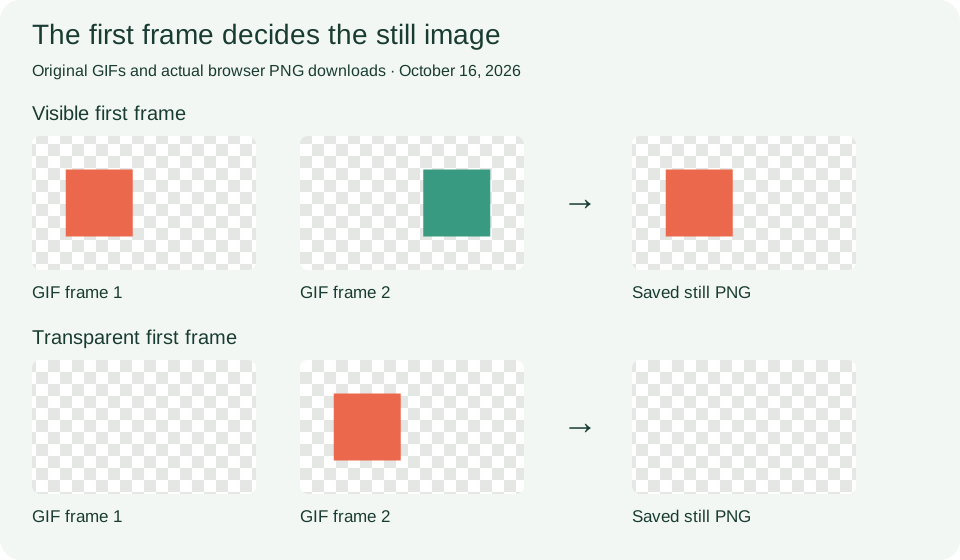
The three-frame sample also includes restore-to-previous disposal and later local frame updates. Its PNG is byte-for-byte the same as the two-frame sample because their first images match. This checks first-frame selection only. It does not establish that this converter reconstructs later frames, handles all disposal combinations or exports animation timing.
Transparent is different from black or white
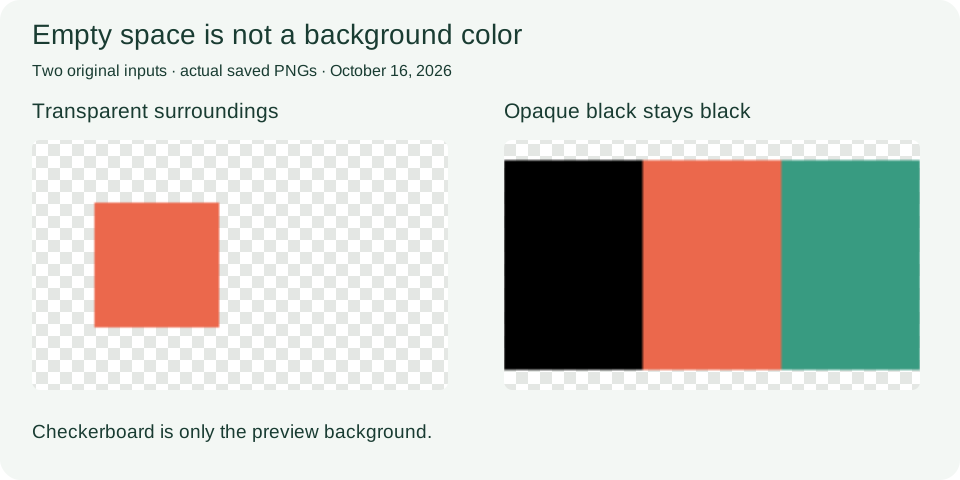
The square in our two-frame sample retains its transparent surroundings. The independent inspection of its PNG found fully transparent and fully opaque pixels, with no intermediate opacity. A checkerboard behind the result helps you see those empty areas; it does not turn white artwork transparent.
Our separate 129 × 65 three-band GIF uses palette entry zero for black but has no transparency flag. Its PNG retains opaque black, coral and green bands. A palette index alone does not make a color transparent. This converter preserves the decoded image; it does not remove a background or soften an already jagged sticker edge.
PNG does not restore colors lost before conversion
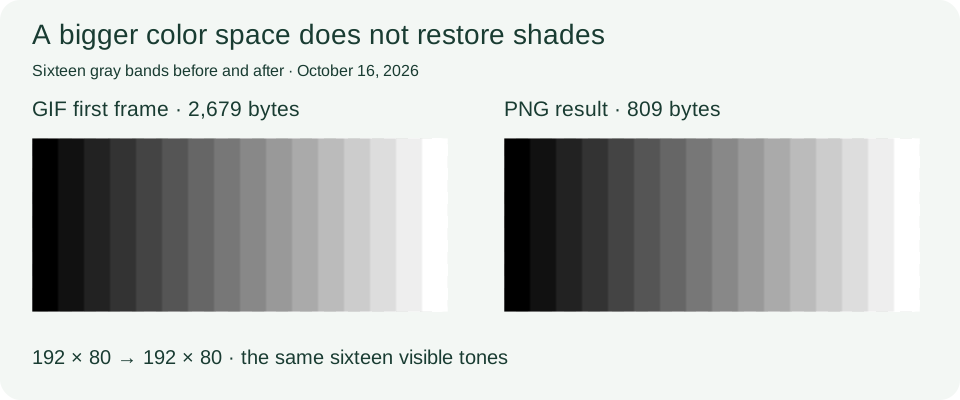
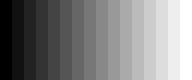
We drew sixteen separate gray bands in a 192 × 80 GIF. The downloaded PNG still contained sixteen visible gray values. Its larger available color space did not invent the shades between the bands. If a gradient was reduced to a palette before you received the GIF, converting that GIF cannot recover the original gradient.
All six tested outputs kept the GIF canvas dimensions, including the odd-sized 129 × 65 image and a 1 × 1 input. The output sizes in the table are measurements of these small synthetic files, not a promise that PNG always compresses better. In particular, comparing a multi-frame GIF with one still PNG also removes animation data, so that size difference is not an equal-content compression benchmark.
Try the dated GIF and PNG pairs
These original synthetic drawings are available under CC0. Test date: October 16, 2026. GIF input dimensions and frame counts are listed below; every PNG has the same width and height as its input. Byte counts refer to these exact files.
| Case and downloads | GIF canvas / frames | GIF bytes | PNG bytes | Observed result |
|---|---|---|---|---|
| Two-frame animation GIF input · PNG output | 160 × 96 · 2 frames | 2,018 | 763 | First coral square only; later green square is absent. |
| Transparent first frame GIF input · PNG output | 160 × 96 · 2 frames | 1,890 | 730 | Fully transparent PNG, even though frame two contains artwork. |
| Black without transparency GIF input · PNG output | 129 × 65 · 1 frame | 1,168 | 514 | All three bands, including black, stay opaque. |
| Sixteen gray bands GIF input · PNG output | 192 × 80 · 1 frame | 2,679 | 809 | The same sixteen visible tones; no new gradient detail. |
| Three-frame disposal case GIF input · PNG output | 160 × 96 · 3 frames | 3,122 | 763 | Only the first frame. Later disposal instructions do not become a sequence. |
| Smallest image GIF input · PNG output | 1 × 1 · 1 frame | 799 | 88 | One opaque coral pixel, without enlargement in the file. |










Dated measurements, dimensions and full SHA-256 hashes · File hashes · Reproduction steps and scope · Input generator
Convert an input above, download your PNG and compare it with the saved output. The recorded browser was the Codex desktop browser on Windows; independent image inspection used Pillow. Other browser versions can encode a different PNG byte stream while displaying the same picture. These tests cover six constructed inputs, not every GIF encoder or damaged file.
GIF to PNG questions
Why did my animation stop?
This page exports one still image from the first GIF frame. It does not create APNG or a sequence of PNGs. The two-frame and three-frame downloads above let you check that behavior directly.
Why is my PNG empty?
The first frame may be fully transparent. Our blank-first.gif reproduces this: the later artwork is not included. Try an extractor with frame selection when you need a later visible frame.
Will my transparent background turn white?
The tested transparent GIF retained transparent surroundings. Opaque white or black in the source remains artwork; this tool does not remove it. Inspect the PNG over the checkerboard before downloading.
Does PNG improve a GIF's colors?
It can store the decoded frame without adding JPEG-style compression, but cannot restore missing source detail. The sixteen-band sample remains sixteen bands after conversion.
Can I get all frames for DaVinci Resolve?
This page cannot export a frame sequence. Use an extractor that provides individual PNG frames with transparency. A public Resolve discussion describes that separate requirement; we have not tested a Resolve import here.
Supported files and error boundaries
Choose one GIF, up to 20 MB. The current converter accepts at most 4096 pixels on either side and 16 million pixels in total. These existing limits are unchanged by this update. Conversion happens in your browser without sending the selected file to a conversion server.
We tested a renamed text file, a truncated GIF header and a 4097 × 1 GIF. Each was rejected without a preview or download. The error files and exact observations are included in the measurement record; they are not evidence of exhaustive malformed-file support.
Format reference: GIF89a specification, sections 20–23, for image descriptors, palettes, transparency and disposal. GIF is a service mark of CompuServe Incorporated. Specifications explain the format; the downloadable pairs document this converter's measured behavior.