 Filepetal
How to convert SVG to PNG
- Choose one SVG file, or paste markup and select Use SVG code. Inspect the source preview.
- Set the width in pixels; height follows the prepared source dimensions. Choose Transparent or White.
- Select Convert to PNG, then download and inspect the actual PNG. The result has fixed pixels, not editable SVG paths.
Why is my logo small inside a large PNG?
The PNG width describes the whole canvas, including empty space. It does not measure the visible logo. Our original circle has a 200 by 100 SVG viewport and a square 100 by 100 viewBox. At an output width of 200, Filepetal downloads a 200 by 100 PNG, yet the nontransparent circle occupies only 60 by 60 pixels. Its measured bounds are [70, 20, 130, 80]. The converter has kept the source layout rather than cropping to the artwork.
In a second original file, only preserveAspectRatio="none" changes. The PNG remains 200 by 100, but the circle stretches horizontally. Nonzero alpha bounds become [39, 19, 160, 80], or 121 by 61 pixels. This count includes low-alpha antialias pixels at the edge; it is not a promise that the mathematical ellipse is exactly that size. W3C defines the default meet behavior as uniform scaling, while none permits different horizontal and vertical scales.
If you need the visible artwork to fill a square icon, prepare an appropriate artboard or viewBox in your authoring tool, preserve the original, and inspect the new export. This page has no automatic crop-to-artwork control and does not rewrite preserveAspectRatio for you. Increasing the PNG width alone scales the canvas and its margins together.
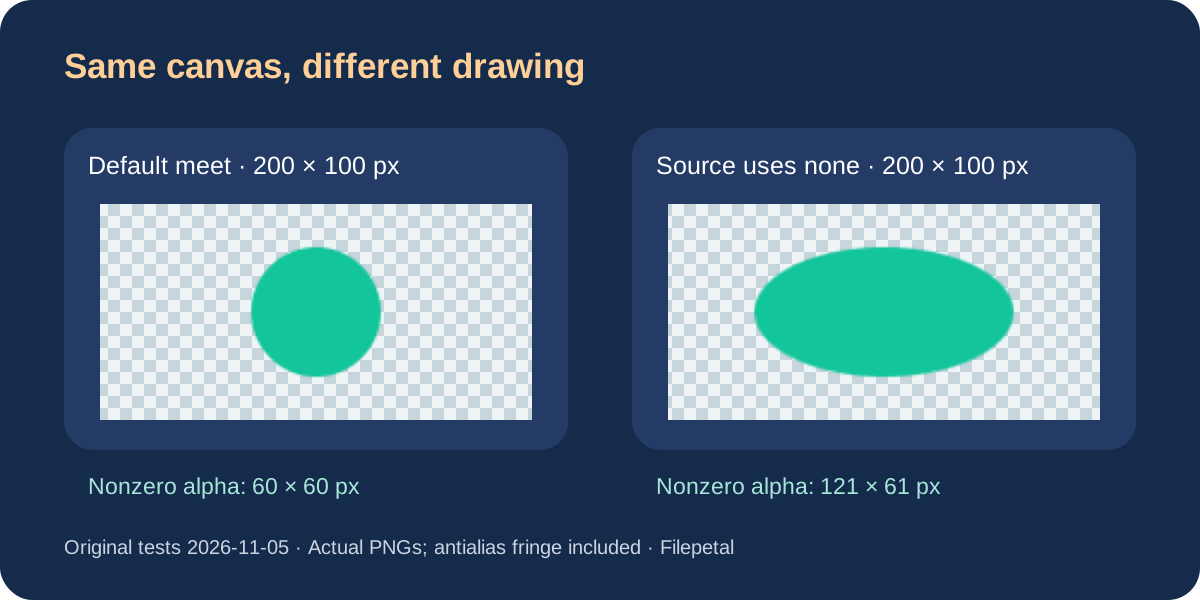
More pixels also scale the empty margins
Changing the first sample from width 200 to 400 produced a 400 by 200 PNG. Its circle bounds doubled to [140, 40, 260, 160], giving a 120 by 120 visible area. The canvas pixel count increased fourfold, but the drawing still occupies the same fraction of the canvas. The downloaded files were 2,048 and 5,051 bytes. Those are measured sizes for this simple source and browser, not a fixed compression ratio or a prediction for your artwork.
A PNG records a fixed pixel grid. Re-export from the original SVG at the required width rather than expecting a previously downloaded PNG to gain editable paths or infinite scalability. Check the actual result in the destination application. These synthetic controls do not test a particular website builder, print workflow or physical phone.
Transparent preserves clear space; White fills the canvas
Our painted-white source contains a white rectangle inside the square viewBox. With Transparent selected, its 200 by 100 PNG retains clear left and right margins: the nonzero alpha bounds are [50, 0, 150, 100]. The rectangle itself remains white. Transparent is not a background-removal operation.
On November 6 we exported the original circle with the tool's White setting instead. This fills the entire output canvas before drawing: all 200 by 100 pixels are opaque, and the corner is white. The actual file is 2,037 bytes. A source shape covers its own mapped geometry; the White setting covers the canvas. Decide which area you need filled, and keep a separate original before editing the SVG.
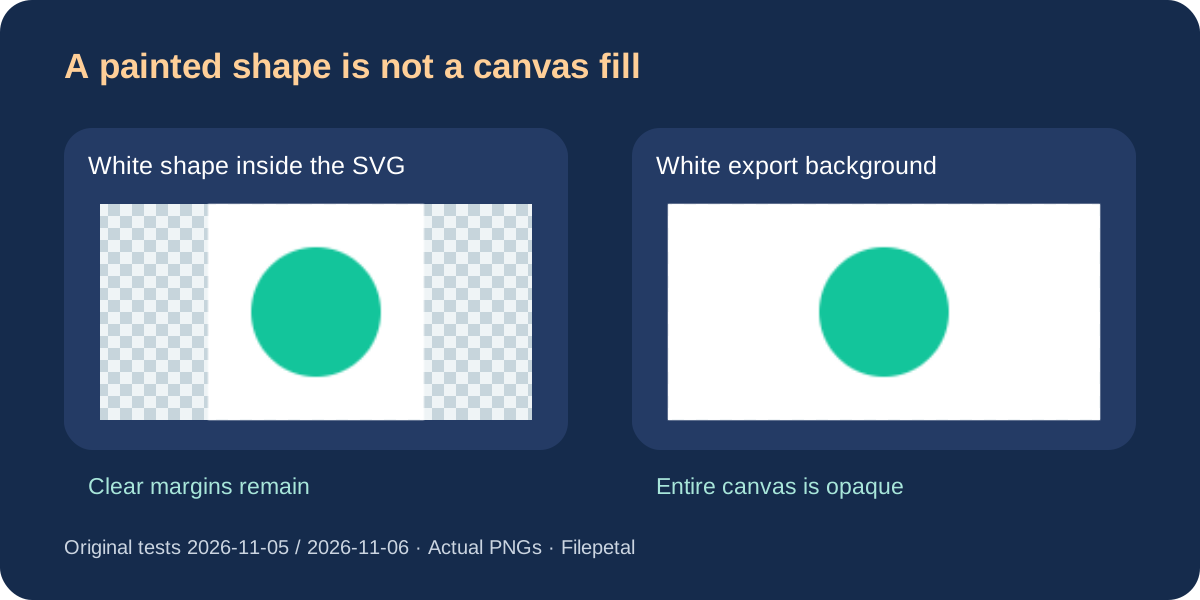
Physical units and viewBox: this tool's boundary
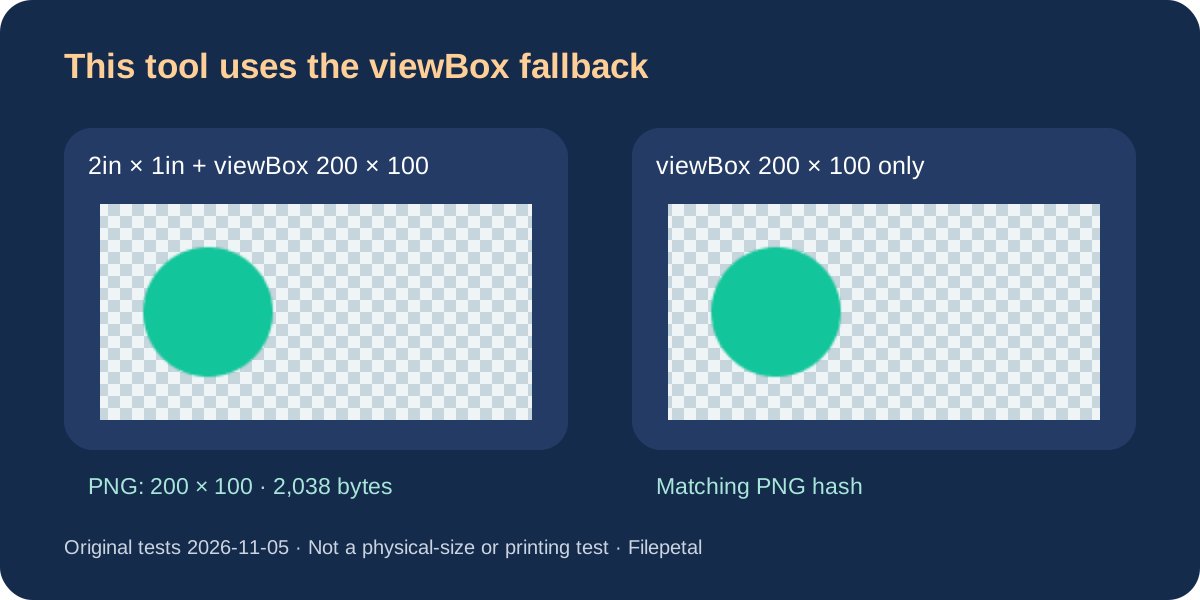
A separate control declares width="2in" and height="1in", plus viewBox="0 0 200 100". Filepetal uses 200 by 100 as the prepared size and returns a 200 by 100 PNG at width 200. Its output hash matches our control that supplies only that viewBox. Both files are 2,038 bytes. This does not verify an inches-to-pixels calculation: the tool's dimension parser accepts plain numbers or px, then falls back to the viewBox and normalizes the root dimensions.
Removing the viewBox from the physical-unit source is rejected here. A correctly drawn SVG in another application is not automatically supported by this converter. For this tool, prepare positive numeric pixel dimensions or a finite positive viewBox. There is no DPI selector or verified physical print-size workflow on this page; these observations do not establish what competing converters support.
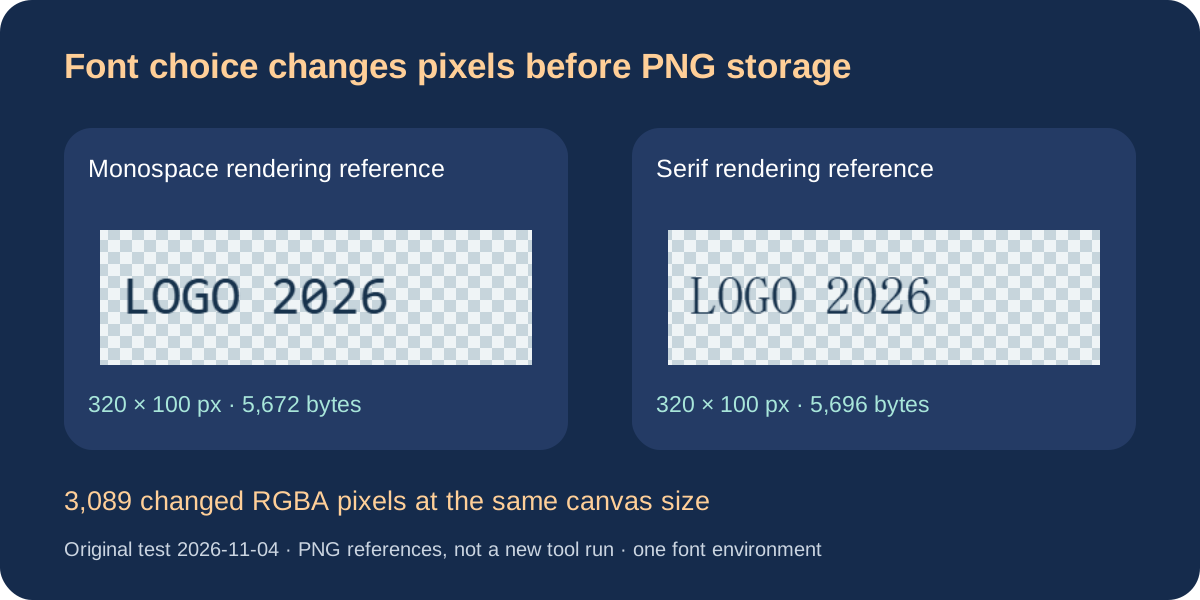
More pixels do not restore a missing font
Check letter shapes before treating the problem as a pixel-size issue. Font selection determines which glyphs are rendered; a larger export width cannot install a missing font. Compare the original SVG with the PNG, and keep the source file. This converter uses fonts available to its rendering environment and does not turn text into paths or embed web fonts.
Our November 4 controls illustrate the distinction with native-browser PNG references. An invented font-family prefix followed by monospace produced the same 320 by 100 PNG as explicit monospace: both are 5,672 bytes with identical SHA-256. Changing only the family to serif produced a 5,696-byte reference with 3,089 different RGBA pixels at the same canvas dimensions. These are rendering references from the SVG to WebP experiment, republished here for diagnosis. They are not new downloads from this SVG to PNG tool and do not predict another device's font rendering.
Two additional controls contain hand-drawn FP paths. Their references match despite different root font-family attributes, because those shapes do not contain text. This does not demonstrate automatic text outlining. If lettering must stay fixed, prepare a separate outlined copy in your authoring tool and inspect the actual export. We did not open Illustrator, test a user's file or verify every SVG text feature.
Does a 300 PPI tag add pixels?
A PNG stores its pixel width and height in IHDR. An optional pHYs chunk can describe the intended physical pixel density. Without that chunk, the PNG leaves physical pixel size unspecified. A layout or print application can apply its own scale.
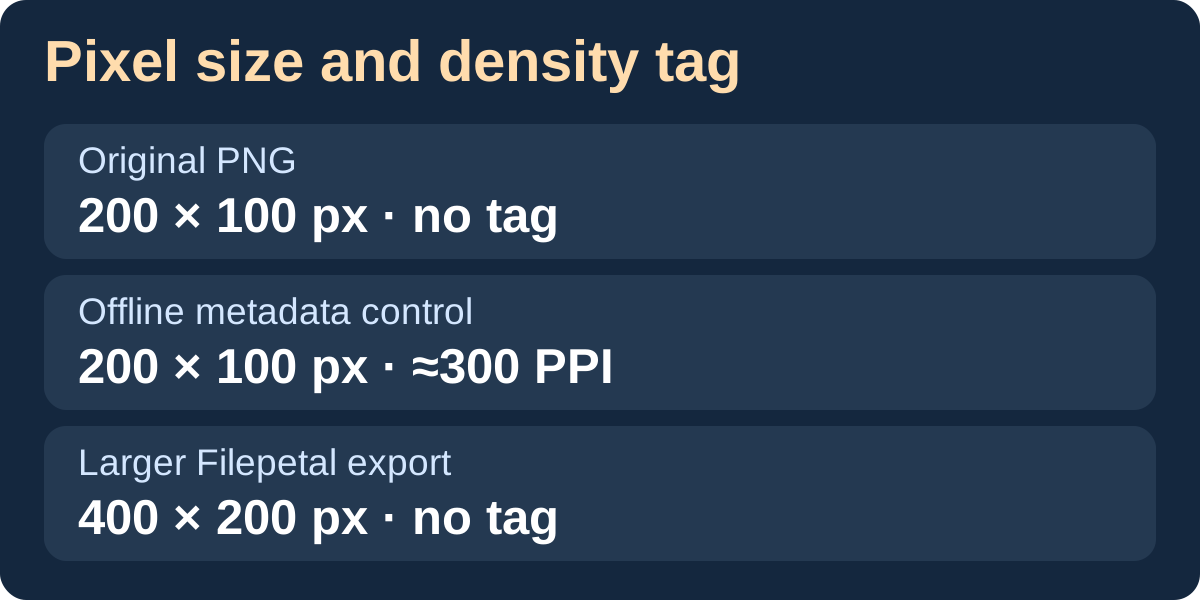
On November 12, 2026, we took the 200 by 100 PNG downloaded on November 5 and added a density tag of 11,811 pixels per metre, about 300 pixels per inch. The control grew by 21 bytes. Its dimensions, compressed image data and decoded RGBA pixels stayed identical. The 400 by 200 download contains four times as many pixels as the 200 by 100 download. Neither Filepetal download in this comparison carried a density tag.
For a print request, multiply the requested width in inches by the requested pixels per inch to calculate the pixel width you need. For example, 2 inches at 300 pixels per inch requires 600 pixels. Export the SVG at the needed width, then check the placement size in your layout app. We tested PNG bytes and dimensions. Print software and physical prints were outside this experiment.
Why does slice cut off the edges of my SVG?
When the SVG viewport and viewBox have different proportions, the preserveAspectRatio attribute decides how the viewBox fits. The default xMidYMid meet centers the full viewBox, which can leave empty strips. A slice setting scales proportionally until the viewBox covers the viewport. That can put artwork outside the visible PNG, and the alignment tells the browser which edge to favor.
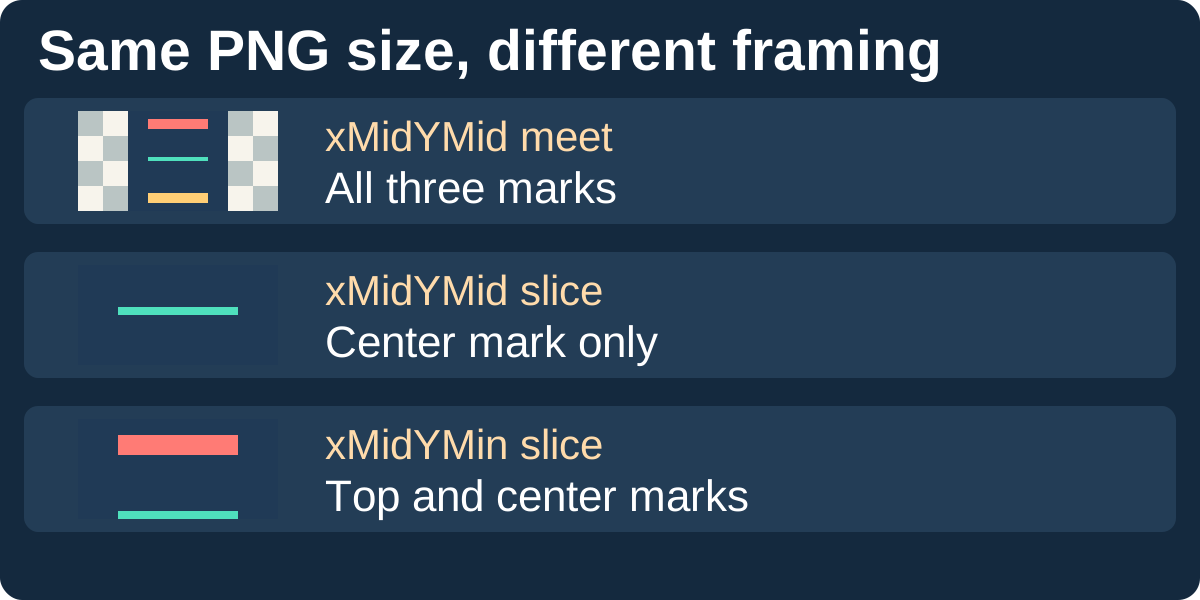
On November 13, 2026, we exported three 200 by 100 PNGs from a square viewBox with three colored markers. Only preserveAspectRatio changed. The centered meet download shows all three markers and has 50 transparent columns on each side. Centered slice fills the viewport and leaves only the middle marker. Top-aligned slice keeps the top and middle markers. All three downloads have the same pixel dimensions.
If the top or bottom of your export disappears, inspect the source preview and the source SVG. Check for slice and compare the SVG width and height ratio with the viewBox ratio. If you need the entire viewBox, try meet in a copy of your SVG and export again. This tool provides an output-width field and uses the prepared source proportions for height. The alignment setting in this comparison comes from the source SVG.
Pixel and density comparison downloads




Viewport framing comparison downloads






Font reference downloads
Original experiment November 4, 2026; file bytes, hashes and pixel differences rechecked November 8. These are historical rendering references, not new conversion outputs today. The full JSON records input/output dimensions, bytes, hashes and scope. Download full record
- font-fallback.svg → font-fallback-reference.png · 320 × 100 px · 5672 bytes
- font-monospace.svg → font-monospace-reference.png · 320 × 100 px · 5672 bytes
- font-serif.svg → font-serif-reference.png · 320 × 100 px · 5696 bytes
- font-path-monospace.svg → font-path-monospace-reference.png · 320 × 100 px · 1867 bytes
- font-path-serif.svg → font-path-serif-reference.png · 320 × 100 px · 1867 bytes









Download and reproduce
Original experiment November 5, 2026; six transparent outputs were downloaded again from the production tool on November 6 and matched the originals byte for byte. The White sample is new on November 6. One desktop in-app browser only; no competing-converter, physical-phone or print tests.
Download the November 5 full record · Download the November 6 White record
| Source | Actual PNG | Pixels and bytes | SHA-256 |
|---|---|---|---|
| meet.svg 140 bytes 4cfabb2d5375518be25809ddd37f70c19d97999dec7189387c4dc73a4f50c37e | meet-recovered.png 2026-11-05 | 200 × 100 px 2048 bytes alpha: 70, 20, 130, 80 | c3e7b820291ca319373f01ee7bfa33af9d7e5895a02aa3726257290ab2dd957b |
| meet.svg 140 bytes 4cfabb2d5375518be25809ddd37f70c19d97999dec7189387c4dc73a4f50c37e | meet-width400.png 2026-11-05 | 400 × 200 px 5051 bytes alpha: 140, 40, 260, 160 | a003b56504c3f9baa72028438755aac44141cf9464d9e189d66b89efb16711f8 |
| meet.svg 140 bytes 4cfabb2d5375518be25809ddd37f70c19d97999dec7189387c4dc73a4f50c37e | meet.png 2026-11-05 | 200 × 100 px 2048 bytes alpha: 70, 20, 130, 80 | c3e7b820291ca319373f01ee7bfa33af9d7e5895a02aa3726257290ab2dd957b |
| painted-white.svg 185 bytes 0ff8c8662e734454ccb78156bda03c5f1a0b24b3efeb67e2d3f09af19299f167 | painted-white.png 2026-11-05 | 200 × 100 px 2046 bytes alpha: 50, 0, 150, 100 | 8494e596fcd29c43c5b4b9dc2b5ef25b2314c85ab8bc64ea1e414b703d7fe4e0 |
| physical-with-viewbox.svg 140 bytes 9164a19d8caa2efebf74ef3f4285ca466e0d1199cf00e2ed77c39b8695d034d3 | physical-with-viewbox.png 2026-11-05 | 200 × 100 px 2038 bytes alpha: 20, 20, 80, 80 | aea434d9619bae00dcd19aeb220361ca1251fd2e69f2a777be96b70fafde643c |
| stretch.svg 167 bytes 7b656990883c4c39d0955f64f4d4d6b5a80f07712ae3e504740ab12bba369641 | stretch.png 2026-11-05 | 200 × 100 px 2847 bytes alpha: 39, 19, 160, 80 | 523059c8f5a09249100d46b9705b905a425bcc94e18150ea1d8a3a9c70a5cf80 |
| viewbox-only.svg 115 bytes b2cbb263a5a97102e1db501ea5aa45888f66499d91bbf611de163cc98685cebd | viewbox-only.png 2026-11-05 | 200 × 100 px 2038 bytes alpha: 20, 20, 80, 80 | aea434d9619bae00dcd19aeb220361ca1251fd2e69f2a777be96b70fafde643c |
| meet.svg 2026-11-05 | meet-white.png 2026-11-06 · White | 200 × 100 px 2037 bytes alpha: 0, 0, 200, 100 | cd2c14385dd169bbfab6bd6846c50c0aa11c55654266d5e93bb4a9ac727c314b |










Nonzero alpha bounds [x0, y0, x1, y1] include antialias fringe and exclude the right and bottom edges. The JSON also records bytes and hashes for all six source files, including the rejection control. Reproduce from the SVG, and inspect the downloaded image rather than inferring pixel dimensions from its extension or preview size.

Supported SVGs and limits
One static, self-contained SVG with the http://www.w3.org/2000/svg namespace, up to 2,097,152 bytes. Shapes, paths, text, gradients and local paint references are rendered by the browser. Source and output are limited to 4096 pixels per side and 16 million pixels total; provide positive numeric pixel dimensions or a valid viewBox.
Scripts, animation, external resources, embedded images, links, foreignObject, use elements, style blocks and style attributes are rejected. Use presentation attributes such as fill and stroke. This page exports one still PNG; SVGZ, batch conversion, background removal, automatic cropping and DPI controls are not provided. Fonts and browser rendering may affect results.
Frequently asked questions
Does output width crop the empty border?
No. The width applies to the whole source canvas. In our 200-to-400 control, both the circle and the empty margins grow. Prepare a separate cropped artboard in the source editor if needed.
Why did a circle become an oval?
Check the source preserveAspectRatio and viewBox. Our none control stretches the drawing while keeping the same PNG canvas dimensions. The converter does not offer a stretch toggle.
Can Transparent remove a white rectangle?
No. It keeps areas that were clear. An opaque white shape in the SVG remains painted; our source-white control retains the white square and clear side margins.
Can I choose inches or print DPI?
Not on this page. It uses numeric pixel dimensions or a viewBox fallback and lets you choose the output width in pixels. Our 2in control with a viewBox is not a print-size test.
Why was my SVG rejected?
Check the 2 MB size limit, dimensions and unsupported markup below. Invalid input clears the previous download. On November 6 the physical-unit source without a viewBox was rejected; a width of 4097 also disabled conversion and removed the old result.
Are text, styles and external images supported?
Text uses fonts available on your device. Style blocks, style attributes, embedded or linked images and other listed active or external content are rejected. This tool does not embed fonts or turn text into paths.
Do I need an account or upload my SVG?
No. Choose a local SVG or paste its markup, convert in this browser, and download one PNG. Keep your original SVG so you can export another pixel size later.
Will increasing the width fix substituted letters?
Not necessarily. Width controls the pixel canvas, while font selection determines the glyph shapes. The dated rendering references above differ at the same 320 by 100 dimensions. Inspect the source font before exporting again.
Does the matching path sample mean Filepetal outlines my text?
No. Those FP shapes were hand-drawn as paths before rendering. This converter does not perform text-to-path conversion. Prepare an outlined copy in your authoring tool when needed.
Why does my PNG report a different PPI in another app?
If the file has no physical density tag, an app may supply its own default. Use the PNG pixel dimensions and the intended placement width to calculate effective pixels per inch. The three dated samples above show a density-only edit and a larger export.
Why are the edges missing even though my PNG size is correct?
Check whether the SVG has a slice setting and whether its viewport ratio differs from its viewBox. In the dated sample, switching from centered slice to centered meet restores both end markers while keeping the PNG at 200 by 100 pixels.
Sources and scope
These original synthetic controls do not represent every SVG or browser. Coordinate behavior follows W3C SVG rules; Filepetal dimension fallback is described from its implementation and actual downloads. No functional advantage over competing converters has been established.