 Filepetal
How to convert TIFF to PNG
- Choose one .tif or .tiff file in the tool above.
- Select “Convert to PNG”. A supported single-page file produces one PNG; multiple pages produce a ZIP containing separate PNGs.
- Check the actual first-page preview and the page list, then download. Keep the original TIFF when you need higher precision or an editable master.
A sharing copy with visible boundaries
TIFF files can hold more than one image and carry orientation information. A download can look successful while showing the wrong direction or losing tonal detail. This page makes the first exported PNG visible and lists the dimensions and byte count of every exported page. It does not edit TIFF layers, remove a painted background, or offer a bit-depth or color-profile selector.
What our original TIFF tests show
A sideways image needs its orientation applied
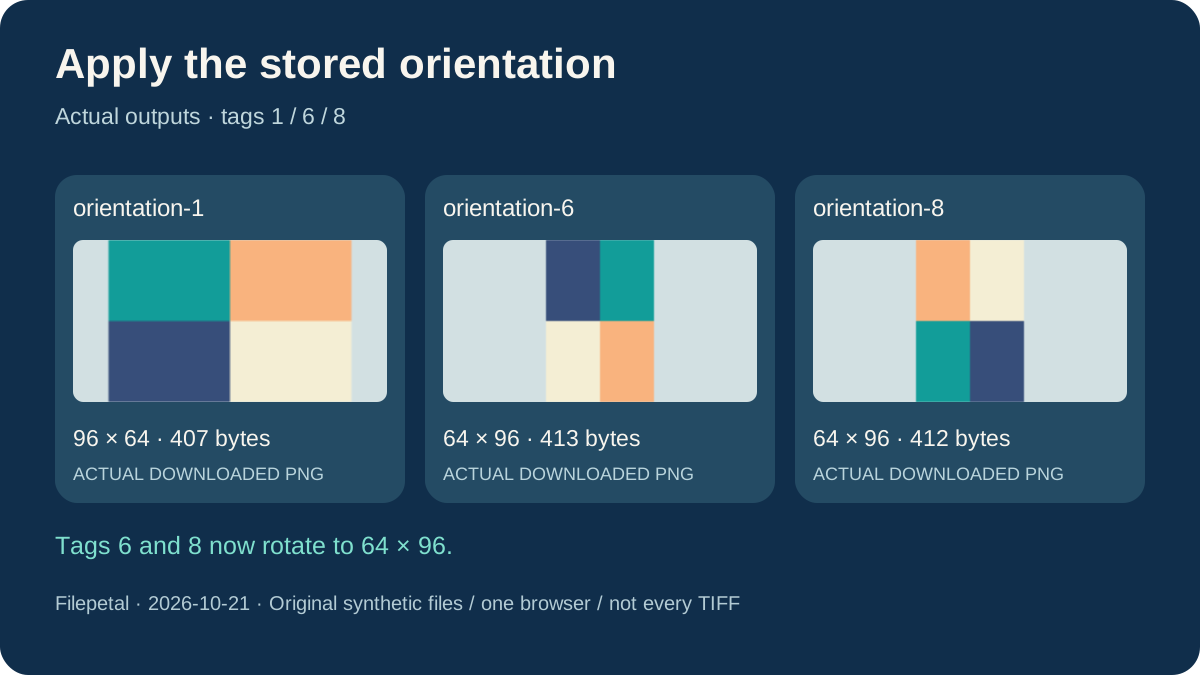
On October 21, 2026, we generated three classic TIFF files with the same four-color pattern stored as 96 by 64 pixels. Only their orientation tags differed: 1, 6 and 8. The previous page exported the same 96 by 64, 407-byte PNG from all three. That was a specific direction-handling defect in this converter, rather than evidence that the source pictures were identical in intended viewing direction.
The updated page applies the orientation while drawing the output. Tag 1 remains 96 by 64 and 407 bytes. Tags 6 and 8 now produce different 64 by 96 pictures, at 413 and 412 bytes. Each actual downloaded image matched an independent Pillow orientation reference for these three files. The result does not rely on the next image viewer noticing the original TIFF tag.
The pattern has distinct corners so a wrong rotation is visible even at a small size. These are controlled synthetic files, not scanned customer documents. The downloadable inputs and generator let you repeat the comparison. This is a fix to our own previous implementation; we did not run the same files through competing converters or establish a unique rotation feature.
Three TIFF pages are three PNGs, not a missing document
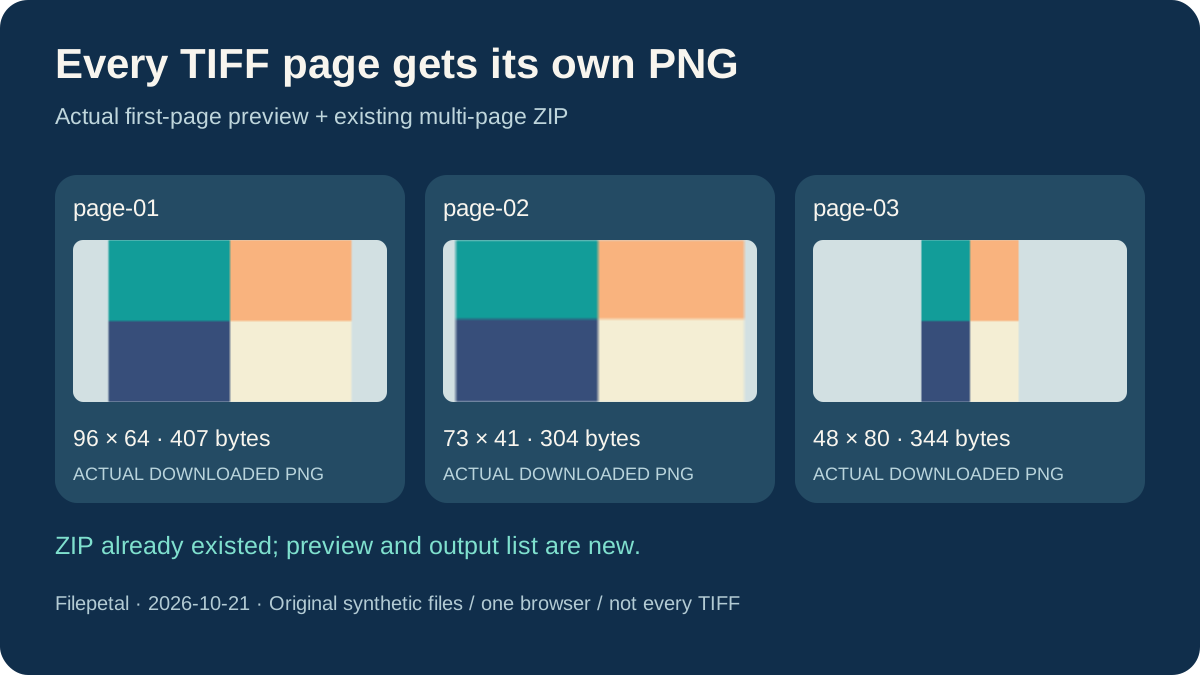
Our three-pages.tiff contains a 96 by 64 landscape image, a 73 by 41 odd-sized image and a 48 by 80 portrait image. Its actual ZIP contains page-01.png, page-02.png and page-03.png in that order, at 407, 304 and 344 bytes. The three images retain their individual dimensions rather than being stretched to a common canvas. The 1,261-byte ZIP is packaging, not a single PNG with all pages.
Multiple-page ZIP export already existed on this page. The new interface adds a preview of the actual first PNG and a list of all output filenames, dimensions and byte counts. It is not an all-page gallery or an individual-page download selector. Open the ZIP to inspect the other pages. A first-page preview alone cannot establish that every page contains the content you expected.
We also cut 1,000 bytes from the end of a raw-strip TIFF. The previous converter still offered a 436-byte partial PNG. The updated checks reject this incomplete payload before offering a download. Empty image-directory input now reports that it has no image pages. These checks cover the tested file boundaries; they do not prove that every damaged or compressed TIFF can be detected or repaired.
PNG supports 16-bit samples; this workflow writes 8-bit output
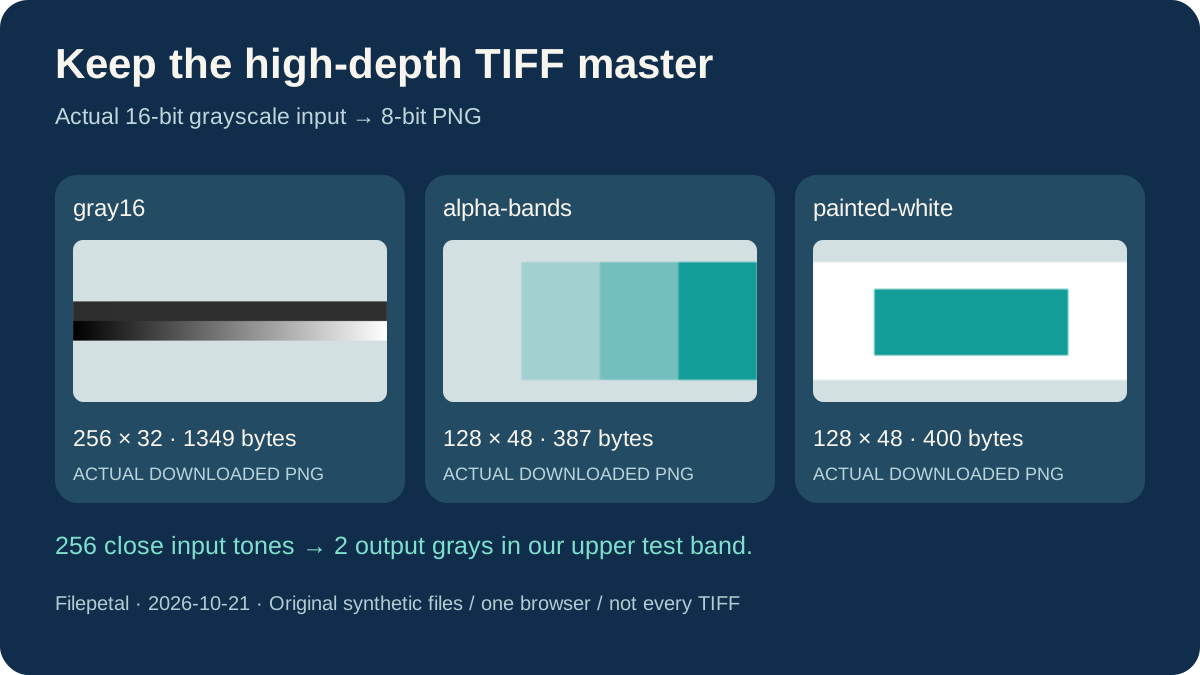
Our 256 by 32 gray16.tiff separates two questions. Its upper half contains 256 distinct 16-bit values from 12,000 through 12,255. The actual 1,349-byte PNG has only two gray levels in that region, 46 and 47. Its lower half spans the full 0 through 65,535 range and produces 256 output grays. The output PNG header confirms an 8-bit sample depth. Changing format in this workflow is therefore not a promise to preserve every source tone.
This is an implementation boundary, not a restriction of the PNG format. The PNG specification permits 16-bit samples, while the UTIF decoding path used here exposes 8-bit RGBA for the browser canvas. Keep your high-depth TIFF for further tonal editing or archival work. Choose an export workflow that explicitly preserves the required bit depth and color profile when those are part of the delivery requirements.
The separate alpha-bands.tiff keeps the tested alpha values 0, 64, 128 and 255 in a 387-byte PNG. Partly transparent RGB values change slightly during the browser round trip, so retained alpha does not certify exact soft-edge colors. painted-white.tiff instead produces a 400-byte PNG with an opaque white corner. Converting formats does not remove white pixels already painted into an image. Both results are available below, along with full hashes and the original test date.
Download the exact TIFFs and actual PNGs
Original synthetic tests: October 21, 2026, in one desktop Chromium browser. The manifest contains input and output sizes, dimensions, full SHA-256 hashes, ZIP membership and error cases. The generator requires Python 3 standard library only. Different browser encoders may produce different output bytes. These samples cover raw-strip classic TIFF, not every compression, color mode or TIFF extension.
| Sample | TIFF | PNG |
|---|---|---|
| orientation-1 | orientation-1.tiff 96 × 64 · 18,584 bytes SHA-2567e62f6d59b83d8101a3f47875f386d4806c26d1a3564dc76ffab07d779051a4c | orientation-1.png 96 × 64 · 407 bytes SHA-2569d8b442903c6f4e1a00304a3be833b17ae91fda7c037087642da6e00bfb19eed |
| orientation-6 | orientation-6.tiff 96 × 64 stored · 18,584 bytes SHA-2568253f37becb35ed43a55b7bbdee9f2cdceb39a089c74700f2eab37d3ffe99ad5 | orientation-6.png 64 × 96 · 413 bytes SHA-256699c596e82db3a09813dc41f6f00b8f3864cfe0fc3fb9d0386cc8442c847955e |
| orientation-8 | orientation-8.tiff 96 × 64 stored · 18,584 bytes SHA-256df18701ff1444d62922a0a071fa594cb3c9e275a571e17e32ce4066626a15e10 | orientation-8.png 64 × 96 · 412 bytes SHA-256f85ae75d5f823bdda5a62c565711024501bfa40824d6f80a10100778b725c316 |
| three-pages | three-pages.tiff 96 × 64 / 73 × 41 / 48 × 80 · 39,371 bytes SHA-256bba89b99b697d5d32860c5de752f95e58f64f4a9ebd380a91ab9e3964235f95b | page-01.png 96 × 64 · 407 bytes SHA-2569d8b442903c6f4e1a00304a3be833b17ae91fda7c037087642da6e00bfb19eedpage-02.png 73 × 41 · 304 bytes SHA-256c17b7ebebbb991ab6e6920b5524798e8b06a6f41c07ce689ddc08b2ba9a9c738page-03.png ZIP · 1,261 bytes48 × 80 · 344 bytes SHA-256bb8c5362a60b3a3bae4666ab638d1046d0a23ae35bc8f7b1d52505cbaf73671b |
| gray16 | gray16.tiff 256 × 32 · 16,530 bytes SHA-256f71be63c953f7edf2786d246d13e418e15ae1c78e37ba3dba600b1b65d60e471 | gray16.png 256 × 32 · 1,349 bytes SHA-2567f33562e458042ff4aaaeee39e9086ee9981e96421c4115c23aab38307beac2a |
| alpha-bands | alpha-bands.tiff 128 × 48 · 24,742 bytes SHA-2564e18c94979df48fae7c09c338f21356eb72dd3791257b7d5d6f375308039cdb6 | alpha-bands.png 128 × 48 · 387 bytes SHA-25621b5cfbecf97d006b6f18b14f9af8f3cdcb150006404eb1d0f0666e0bb95f6c5 |
| painted-white | painted-white.tiff 128 × 48 · 18,584 bytes SHA-2563e8d39312b26ac06a7ba4baed82fdecfeb1255e0de2721274b660ea5835e6089 | painted-white.png 128 × 48 · 400 bytes SHA-2565ec9465d3b5f2ebfbb932e7c08ae71ef52ae34d626d7e30238a1a1cfe70e0c66 |





Full input/output hashes and verification manifest · Input generator
Diagnostic inputs: truncated-strip.tiff · twenty-one-pages.tiff · no-pages.tiff · bigtiff.tiff · not-tiff.tiff ·
Current scope and limits
One input at a time, up to 20 MB and 20 pages. The existing raster limits remain 4096 pixels per side, 16 million pixels per page and 40 million pixels across the file. BigTIFF is unsupported. This path writes 8-bit PNGs and has no precision or color-profile selector. Conversion runs locally in the browser. This update does not add batch file selection, TIFF editing, damage repair or background removal.
TIFF to PNG questions
Why did my TIFF turn sideways after conversion?
An orientation tag can describe a different viewing direction from the stored pixel arrangement. This page now applies that tag. Our tag-6 and tag-8 test files export as 64 × 96 instead of the old 96 × 64 result. Check the actual preview before sharing.
Where are the other pages in my TIFF?
A multi-page input downloads as a ZIP of separately named PNGs. Our three-page test contains page-01.png through page-03.png at their original individual sizes. The page previews the first image and lists all output pages; inspect the other images after opening the ZIP.
Will a 16-bit TIFF keep all its tonal detail?
Not through this workflow. The tested 16-bit grayscale input became an 8-bit PNG, with 256 close input tones collapsing to two output grays in the upper test band. PNG itself can support 16 bits; keep the TIFF or use an explicitly high-depth export workflow when needed.
Does PNG output make a white background transparent?
No. Existing alpha survived in our alpha-band sample, while painted white remained opaque. This converter changes the file format and does not select or erase background pixels.
Why is an incomplete TIFF rejected?
The converter checks the referenced strip or tile data ranges and rejects the tested truncated raw image. Ask for a complete copy. The checks do not repair damaged files or certify every compression method.