 Filepetal
How to convert PNG to ICO
- Choose one PNG above.
- Select “Convert to ICO” and inspect the actual icon preview, including transparent space and small details.
- Download the ICO. Keep your original PNG for later edits.
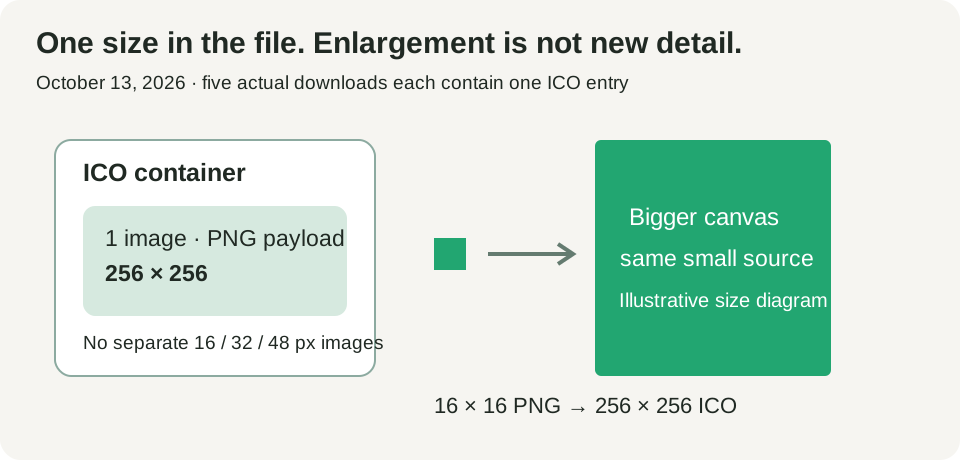
The preview opens the same ICO file offered for download. Its checkerboard is a display background, not part of your icon. The result is one 256 × 256 image inside an ICO container. It does not include separate 16, 32 or 48 pixel versions, a web manifest or an installation package.
Which PNG can I use?
Choose one valid PNG, up to 20 MiB (20,971,520 bytes), at most 4096 pixels on each side and 16 million pixels total. These are this tool’s current input bounds, not a general limit of the ICO format. Conversion runs locally in your browser. There is no size selector, batch control, crop control or background remover.
A square source avoids extra borders. Rectangular artwork is centered with its shape intact; transparent space fills the remaining square. Small inputs are enlarged to fit, so a bigger output dimension does not prove that the artwork has gained detail. Use the preview to check a recognizable corner and the outline before saving.
What our PNG to ICO samples actually produced
On October 13, 2026, we converted five original synthetic PNGs in the live Filepetal tool, saved the offered ICO downloads, then repeated the conversions in the updated tool. We decoded the complete ICOs and their embedded PNG images with Pillow 11.3.0 and inspected the icon directory separately with Python. All five outputs contain exactly one 256 × 256 image. These results describe this desktop in-app browser and these files; the browser engine version was not recorded.
| Original sample | PNG input | ICO output | What changed |
|---|---|---|---|
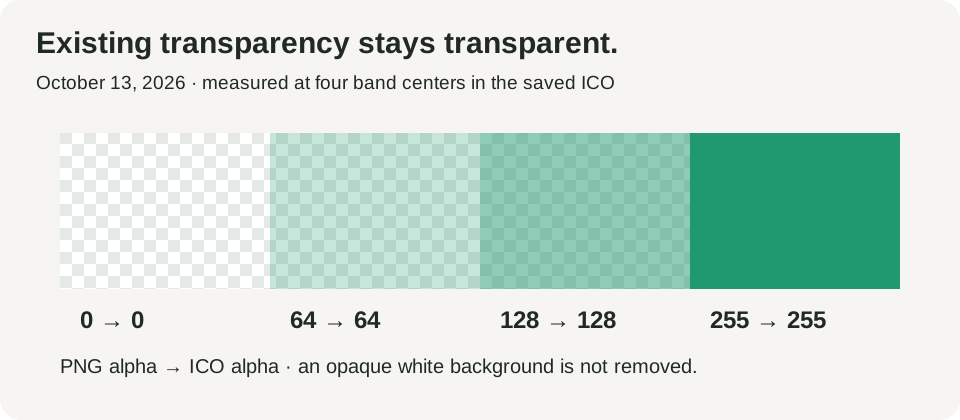
| Transparency bands · ICO | 256 × 256 · 868 bytes | 256 × 256 · 2,412 bytes | Band-center alpha remained 0, 64, 128 and 255. |
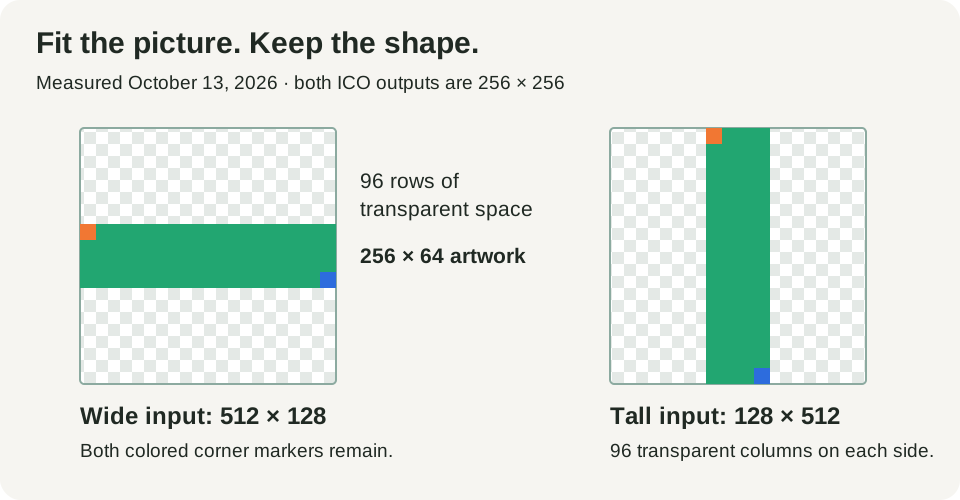
| Wide corner markers · ICO | 512 × 128 · 646 bytes | 256 × 256 · 2,462 bytes | Artwork occupies 256 × 64; 96 transparent rows above and below. |
| Tall corner markers · ICO | 128 × 512 · 1,332 bytes | 256 × 256 · 2,442 bytes | Artwork occupies 64 × 256; 96 transparent columns on either side. |
| Small diagonal · ICO | 16 × 16 · 175 bytes | 256 × 256 · 19,505 bytes | The source is enlarged; new intermediate colors appear along edges. |
| Fine stripes and text · ICO | 512 × 512 · 3,988 bytes | 256 × 256 · 3,445 bytes | Alternating one-pixel black and white stripes merge into gray. |





Rectangular pictures keep their shape, with transparent borders
The wide marker was scaled by one half: 512 × 128 became 256 × 64 inside the square. In the saved icon, its nontransparent area starts at row 96 and ends before row 160. The orange upper-left and blue lower-right markers both remain visible. The tall version has the same behavior across columns, from 96 to before 160. This is fitting, not stretching into a square or cropping away the corners.
For a wide logo, those empty rows make the visible artwork smaller than a square logo in the same icon slot. If that leaves the subject too small, prepare a simpler square composition in an image editor first. This converter has no crop setting. A transparent border does not mean the file failed or that the original white background was removed.
Transparency survives in the tested bands, without background removal
The four bands begin with alpha values 0, 64, 128 and 255. Their saved ICO band centers retain those four values: invisible, two degrees of partial transparency and opaque. The square needs no extra border for this input. Color values were not all identical: the partly transparent green center changed from RGB (32, 152, 112) to (32, 151, 112). That small change is why this result supports the tested transparency behavior rather than a claim of perfect color preservation.
Try placing the downloaded icon on light and dark surfaces in the application that will use it. Our browser preview and independent decoding confirm these samples, but do not verify every Windows shell, legacy editor or build pipeline. An opaque white area in a PNG remains artwork; converting the file does not identify and erase a background.
Enlargement and reduction change small details
The 16 × 16 diagonal grows to 256 × 256, a scale factor of 16 on each side. The saved output has intermediate colors along the diagonal and square edges; it is not an exact grid of enlarged source blocks. Its 19,505 bytes also exceed the 175-byte input. A large icon file can therefore contain enlarged small artwork, and file size alone does not tell you whether it will look sharp.
The fine-detail sample illustrates the opposite direction. Its 512 × 512 picture is reduced to 256 × 256. At row 32 of the output, the original alternating black and white stripes have merged into a uniform RGB (127, 127, 127). The center green panel remains recognizable, but the tiny source lettering is visibly softer in the saved image. Inspect a simple silhouette rather than assuming every line will survive resizing.
Neither experiment tests the appearance at every desktop or browser icon size. A dedicated small-size drawing may read better than a scaled detailed logo. This tool supplies a single size, so use a tool with separately designed or generated sizes when your application requires them.
One image in the icon container
Every saved file has one directory entry and a PNG payload beginning at byte 22. The directory’s width and height bytes are zero; the decoded image is 256 × 256, not an empty image. Microsoft documents this zero-byte convention in its ICO format explanation, and explains PNG images inside ICO separately. We checked both the directory and payload, so this measurement is more than a renamed PNG.
The five ICOs are exactly 22 bytes larger than their extracted PNG payloads. Their differing total sizes come mainly from the encoded resized picture, not from an included set of other resolutions. The output record links that conclusion to each exact download. Microsoft’s icon documentation also describes selecting between multiple stored images; our result does not provide that choice.
Errors checked before download
We also selected three synthetic problem files: a text file named PNG, a 40-byte truncated PNG and a valid 4097 × 32 PNG beyond the current side bound. Each returned an error and offered no ICO download. The wrong-header, truncated and oversized inputs let you repeat those boundaries. These cases do not exhaust corrupt PNGs or establish a maximum for every device.



Repeat the sample study
Download a paired PNG and ICO above. Convert that PNG in the tool, inspect its preview and save the result. The input manifest and output record include dimensions, byte counts, SHA-256 hashes and the actual test date. Use the CC0 fixture generator, independent inspection script and reproduction notes to repeat the checks. Extracted PNG payloads are included for viewers that cannot open ICO.
A hash identifies the exact recorded file. Different browser encoders can produce different bytes without demonstrating a broken icon. We did not test color-profile fidelity, 16-bit sources, animated PNG handling, real phone hardware or installation into every operating system. The dated paired measurements add evidence; previews and transparency are common converter capabilities, and no exclusive functional advantage has been established.
PNG to ICO questions
Why does my rectangular logo have empty space?
This tool fits it inside a square while keeping its proportions. Our 512 × 128 sample became 256 × 64 with 96 transparent rows above and below. Prepare square artwork first if that visible area is too small.
Does this create several icon sizes?
No. Our five downloads each contain one 256 × 256 image. There is no size selector or favicon package. Use a multi-size icon tool when your target requires separate small images.
Will a small PNG become sharper?
Conversion enlarges a small PNG but does not restore absent detail. Our 16 × 16 sample gained intermediate edge colors when scaled to 256 × 256. Inspect its actual preview before using it.
Does conversion make the background transparent?
Existing transparency survived our band test; an opaque background is not removed. The checkerboard only helps you see transparent areas in the preview.
Why is my ICO larger than my PNG?
The picture is resized and re-encoded, then wrapped in an icon container. Our 175-byte small source produced a 19,505-byte ICO. A smaller download is not promised.