 Filepetal
How to convert SVG to DXF
- Export plain SVG paths or shapes with explicit width and height. Convert text to paths in your editor first.
- Choose the SVG and select Convert to DXF. Unsupported content produces an error instead of a partial drawing.
- Inspect the actual DXF geometry preview and dimensions, then download. In your CAD/CAM program, confirm millimetres and measure one known length.
Check the size and the paths, not just the picture
SVG describes a graphic; DXF describes drawing geometry. A conversion can look familiar and still have the wrong physical scale or an open contour. This tool writes a DXF R2000 file containing two-dimensional polylines with millimetre coordinates. It exports geometry, not the painted appearance of your SVG. The preview is read back from the generated DXF text. It is useful for inspecting the paths, but is not a cutting simulation, CAD compatibility certification or approval to run a machine. Keep your editable source and inspect the imported drawing in the application where you intend to use it.
Original size, stroke and closure experiments
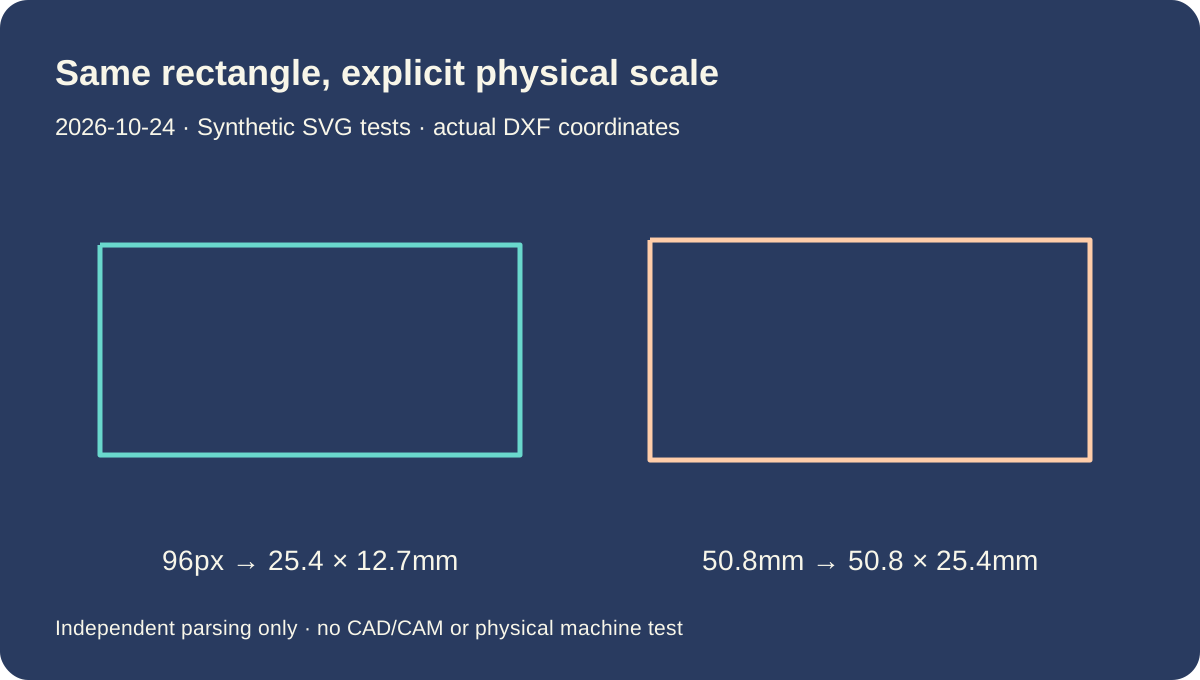
96 pixels and 25.4 millimetres: compare the saved coordinates
On October 24, 2026, we generated two SVG files containing the same full-canvas rectangle and the same viewBox, 0 0 96 48. One declares width 96px and height 48px; the other declares 25.4mm and 12.7mm. We selected and converted both in the actual browser tool. The two downloaded DXFs are each 218 bytes and are identical byte for byte. An independent ezdxf 1.4.5 read of those files finds a closed four-vertex polyline with coordinate extents 25.4 × 12.7 millimetres.
This follows the CSS absolute-unit relationship: 1 inch = 96 CSS pixels = 25.4 millimetres. For this input, 96 × 25.4 ÷ 96 = 25.4mm. The browser is not measuring your monitor or inferring a laser-bed size. The source dimensions establish the intended scale. A third input keeps the same viewBox but declares 50.8mm × 25.4mm. Its actual downloaded DXF has twice the width and twice the height. That is a controlled change to the drawing scale, not extra detail or a different raster resolution.
Each output declares INSUNITS as 4, the DXF millimetre code. That declaration does not prove every importer will use it automatically. If a receiving program interprets millimetre coordinates as inches, the drawing can be the wrong physical size despite a correct preview here. Confirm the receiving units and measure a known edge there. We parsed and audited the downloads independently; we did not open them in every CAD product or send them to a physical cutter. A passed file audit is narrower evidence than a successful machine job.
A thick stroke does not become two cutting edges
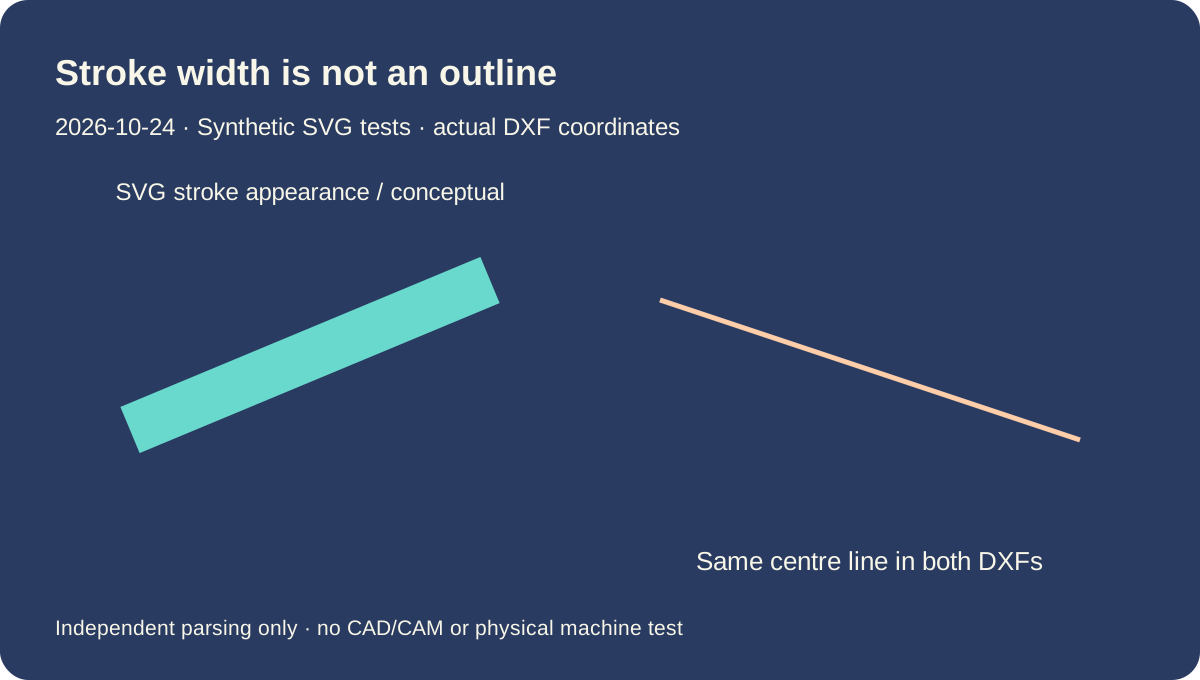
We made a pair of SVGs with the same open line from 12,12 to 84,36. Only stroke-width changes, from 1 to 12 source units. Their actual downloaded DXFs are identical: 203 bytes, one open polyline and two vertices. Both have coordinate extents 19.05 × 6.35mm. The wide painted band that a browser shows in the second SVG does not become an outlined band in this converter. Both outputs describe the same centre line.
That distinction matters if you want the outside silhouette of lettering, a thick logo stroke or another painted shape. A line with a thick stroke is still a line geometrically. Use your authoring application to expand the stroke into a closed outline, then inspect that outline before exporting a supported SVG. This page does not perform stroke expansion, trace a bitmap, preserve color fills or generate offsets. Filling an open shape can also make it look closed without adding a close-path command to the source.
The diagram below plots the vertices extracted from the actual DXF downloads, alongside a clearly marked conceptual illustration of stroke width. It is not a screenshot of a cutting program. Geometry extends to its coordinates; this converter does not clip paths to the SVG viewport. Paint properties are not used to infer which edges you want to cut. Remove unwanted geometric objects in the source instead of relying on their fill or stroke color to hide them. CSS, opacity, masks, clipping and other unsupported appearance controls are rejected rather than silently interpreted.
Separate subpaths and a close-path flag are different things
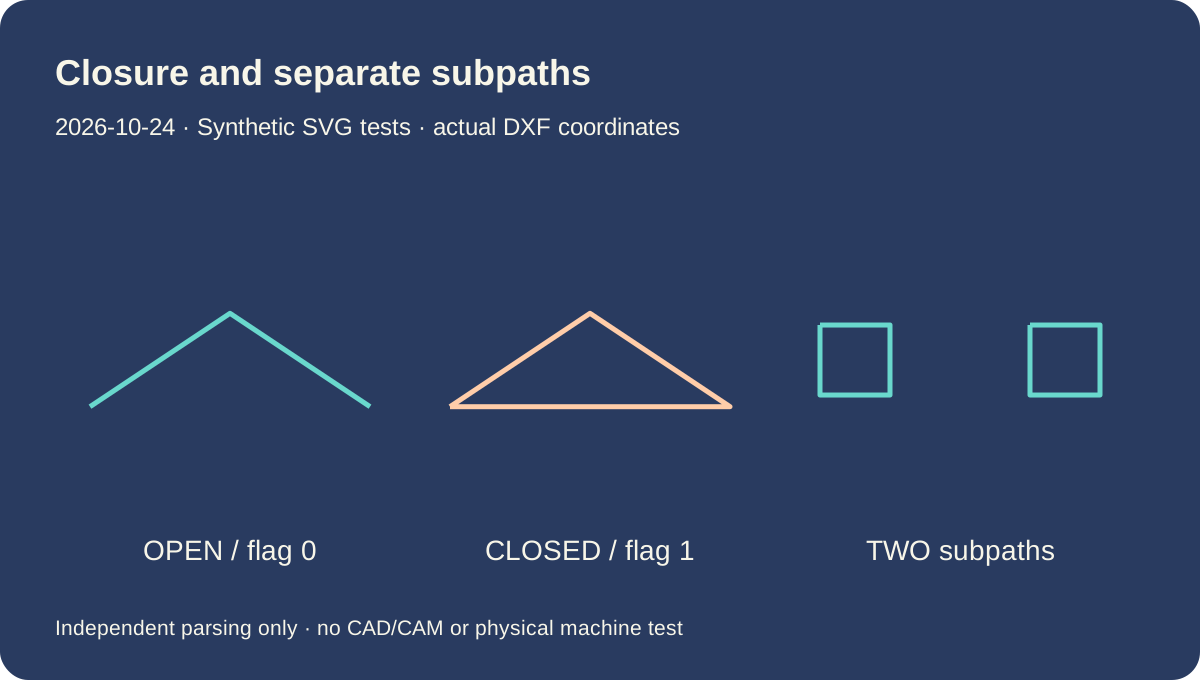
Our open-triangle and closed-triangle SVGs contain the same three vertex positions. The second adds Z at the end of the path. Each actual download is 220 bytes and measures 19.05 × 6.35mm, but the polyline closed flag differs. The open result has two segments; the closed result adds the segment back to the first vertex. A filled SVG can make those inputs look alike, so neither output dimensions nor file size alone tells you whether the contour is closed.
Another input uses two M commands in one path to describe two separated squares. The actual 355-byte DXF contains two closed four-vertex polylines, with no connecting line across the gap. The drawing spans 25.4 × 6.35mm overall. We also tested a translated and rotated rectangle. Its downloaded bounds are 3.175 × 6.35mm, matching the transformed rectangle rather than its original axis order. These are specific synthetic checks of subpath separation and group transforms, not a promise that any editor export will be accepted.
The cubic-curve sample becomes an open polyline with 145 vertices. Its end points span 25.4mm in X; its sampled Y extent is about 3.665582mm. A separate circle becomes a closed 120-vertex polyline. Curves are approximated by straight segments and are not exported as exact spline or arc entities. The sampling rule uses transformed control-polygon length with a 0.5mm planning step; that is not a certified maximum deviation. Nine diagnostic inputs were rejected with no download, including text, an image, an arc command, percentage dimensions, hidden CSS and malformed XML. Download them to see the actual supported boundary.
Download the exact SVG inputs and actual DXF outputs
Original synthetic files tested October 24, 2026 in one desktop browser. The source viewBox is 0 0 96 48; physical dimensions come from each SVG width and height. Output extents below are measured from actual DXF vertices in millimetres, not the canvas or a simulated machine. All 11 downloads parsed with ezdxf 1.4.5 with zero audit errors and zero audit fixes. No competitor conversion or CAD/CAM application was tested. Full file hashes and diagnostics are available.
| Sample | SVG | DXF |
|---|---|---|
| bezier | bezier.svg 158 bytes SHA-256e62fae7cc23cdd4f4d78e2938c516fc73cc77cd143e85c3ed11abedad703283b | bezier.dxf 25.4 × 3.665582 mm · 3665 bytes SHA-256df5a7eca238f2edb5e520a0cb48267853d1914b424f526b36c11d7f4afa55dc4 |
| circle | circle.svg 128 bytes SHA-256d6c60f7203f7585f69690405617f010475431a77e8f83c90614b1ee993b06581 | circle.dxf 9.525 × 9.525 mm · 3100 bytes SHA-256eab40d087aa95bbd08c782cbe8331da89eef7cde4d11fcfe6213e4faf4a32a52 |
| closed-triangle | closed-triangle.svg 130 bytes SHA-256271978284165a66370213be8f71f433f923e872b3bdcc7e0e3a86ee936d280c2 | closed-triangle.dxf 19.05 × 6.35 mm · 220 bytes SHA-25631646caf30a31fe0b430833f3034a7d88b251d1ff52defac4ab039ef193a2467 |
| double-size | double-size.svg 142 bytes SHA-25646ba71ec5f06669a773dc34291397d79eaec537c0973440408250c7e6db976be | double-size.dxf 50.8 × 25.4 mm · 218 bytes SHA-256f86a98ce5b1a16c708ee90bce1393a2a8fe0e6d04aee4dc3d4fddcec79a3f408 |
| group-transform | group-transform.svg 185 bytes SHA-256bb6d88acb0355516500fb7716df3a614269d232f885971456071ddd5d7a68f78 | group-transform.dxf 3.175 × 6.35 mm · 226 bytes SHA-256eeb63d8a0db6e20e98b6ea910715f5dd089e3718f814df8f7024bc38419fc80e |
| millimetres-25_4 | millimetres-25_4.svg 142 bytes SHA-2568962a1fa56744268bdaaf362b8ef89a26a2590e2f2f12a7d0f09c99d3db3af1c | millimetres-25_4.dxf 25.4 × 12.7 mm · 218 bytes SHA-256577b1862396063413bda789ca1f1c82bc538a925eb64dc110a6c00d359c12390 |
| open-triangle | open-triangle.svg 128 bytes SHA-256a8f7b11880ff330f951f88d8cc197e97a7e3ad50457f2b2bf95cf7ba4cc2684c | open-triangle.dxf 19.05 × 6.35 mm · 220 bytes SHA-256f7518e1acad6b2b2aad65c8ba8829864f733d6c39db6bf738ad3cc25d0c4e2b5 |
| pixels-96 | pixels-96.svg 138 bytes SHA-25636c4ef670c011d506f2fc50478b1b3218bb5737422aa440ab194cc87fcf8eaee | pixels-96.dxf 25.4 × 12.7 mm · 218 bytes SHA-256577b1862396063413bda789ca1f1c82bc538a925eb64dc110a6c00d359c12390 |
| separate-subpaths | separate-subpaths.svg 145 bytes SHA-25612d4ff313606f7eb9380b43bea78e396639481f07580e1ea5bcb8f18df114316 | separate-subpaths.dxf 25.4 × 6.35 mm · 355 bytes SHA-256f36053b8494af2d2b09ac836b83f0e6e9f78c02b4db9f753480d0d82e5d69960 |
| stroke-thick | stroke-thick.svg 166 bytes SHA-256cb54afb54226dc9f0d5699ff113d5590c8390cd0bc0e7dd88f2accacc73675fa | stroke-thick.dxf 19.05 × 6.35 mm · 203 bytes SHA-25628606704d2abd60885072344c2e4af0d16c1537875c14f46d3db2e69189c8866 |
| stroke-thin | stroke-thin.svg 165 bytes SHA-2560ecadc2577b7c2333b1640c8e87c5f6d2e0931fa7a82b8ae4df2f3fe55eb82de | stroke-thin.dxf 19.05 × 6.35 mm · 203 bytes SHA-25628606704d2abd60885072344c2e4af0d16c1537875c14f46d3db2e69189c8866 |


Dated input/output and diagnostic manifest · Input generator · SHA256SUMS
Diagnostic inputs (expected rejection): bad-percent.svg · bad-text.svg · bad-arc.svg · bad-image.svg · bad-script.svg · bad-style.svg · bad-xml.svg · bad-root-transform.svg · bad-namespace.svg ·


Supported geometry and deliberate boundaries
One SVG up to 2 MB. Use explicit positive width and height in mm, cm, in, pt, pc or px; unitless dimensions use CSS pixels. Percentages are unsupported. Supported shapes are plain rect, line, polygon, polyline, circle and ellipse; supported path commands are M, L, H, V, C, Q and Z, absolute or relative. Convert A, S and T commands to supported paths first. Groups support matrix, translate, scale and rotate. Root transforms, nested SVG, rounded rectangles, text, images, use, defs, scripts, CSS and effects are unsupported. Use preserveAspectRatio none or xMidYMid meet. Curves are sampled, with at most 4096 segments per curve; the tool also bounds element and vertex counts to avoid excessive browser work. It does not join gaps, expand strokes, trim overlaps, preserve layers, detect kerf, add toolpaths or certify a drawing for fabrication.
SVG to DXF questions
Why is my SVG the wrong size after importing the DXF?
Check the SVG width and height and the receiving application units. Our 96px rectangle exports 25.4mm wide, following 96 CSS pixels per inch. The file declares millimetres, but an importer can apply its own unit choice. Measure a known edge in the destination.
Can I turn a thick stroke into an outline?
Not with this tool. Our 1-unit and 12-unit strokes export the same centre line. Expand the stroke in your source editor, then export a supported closed outline and inspect it.
Why is a shape open when it looked filled in the SVG?
Painted fill does not close the geometric path. In our triangle pair, adding Z changes the DXF closed flag while the bounds and byte count stay the same. This tool preserves closure and does not automatically join endpoints.
Will this keep curves perfectly smooth?
Curves are exported as sampled straight-segment polylines, not exact Bezier, spline or arc entities. Inspect the curve at the size you will use. The sampling step is not a guaranteed geometric-error tolerance.
Can I use the preview as approval to cut or engrave?
No. The preview displays generated DXF paths, not motion, material, tool compensation or machine settings. We tested our synthetic files and independent parsing only. Check the file in your actual CAD/CAM workflow before any physical operation.
Sources and evidence scope
W3C CSS absolute units · W3C SVG paths · Autodesk LWPOLYLINE · Autodesk INSUNITS · ezdxf reader